DzoSDK Document
English
2022-03-16DzoSDK For IOS Native Document v2.11
To always link to the most recent version, link to the Facebook /Google iOS SDK with CocoaPods rather than downloading the SDK itself.
1. Navigate to *.xcworkspace in your project folder in a terminal window.
2. Make sure you have the CocoaPods gem installed on your machine before installing the Facebook and Google pod.
$ sudo gem install cocoapods
$ pod init
This will create a file named Podfile in your project's root directory.
3. Add the following to your Podfile:
platform :ios, '9.0'
use_frameworks!
#Google Pods
pod 'GoogleSignIn'
pod 'Firebase/Messaging'
pod 'Firebase/Analytics'
pod 'Firebase/DynamicLinks'

#Facebook Pods
pod 'FBSDKLoginKit'
pod 'FBSDKShareKit'
pod 'FBSDKCoreKit'
pod 'FBSDKGamingServicesKit'

#Appflyer Pods
pod 'AppsFlyerFramework'
4. Run the following command in your project root directory from a terminal window:
$ pod install
5. Open your app's .xcworkspace file to launch Xcode. Use this file for all development on your app.
Example Picture:

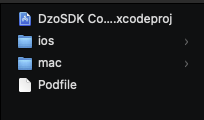
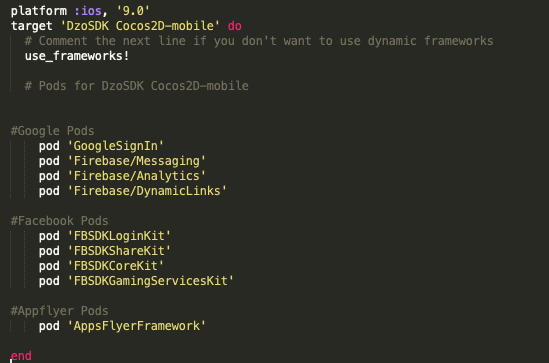

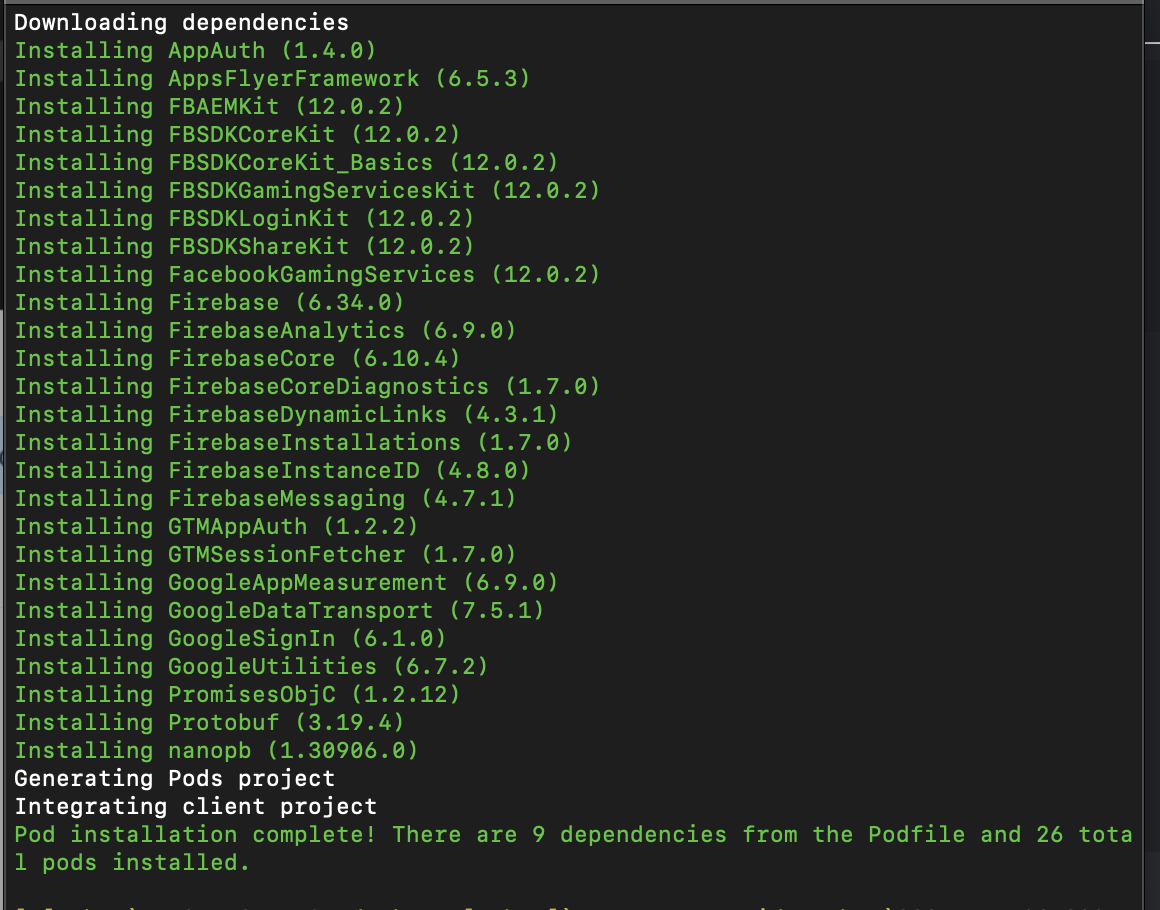
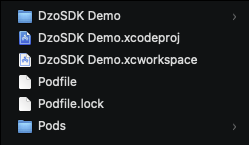
Configure the Info.plist file with an XML snippet that contains data about your app.
1. Right-click Info.plist, and choose Open As ▸ Source Code.
2. Copy and paste the following XML snippet into the body of your file (
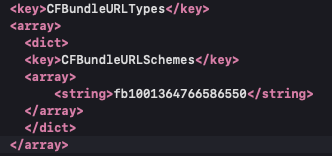
<key>CFBundleURLTypes</key>
<array>
    <dict>
        <key>CFBundleURLSchemes</key>
        <array>
            <string>fbAPP-ID</string>
        </array>
        </dict>
    </array>
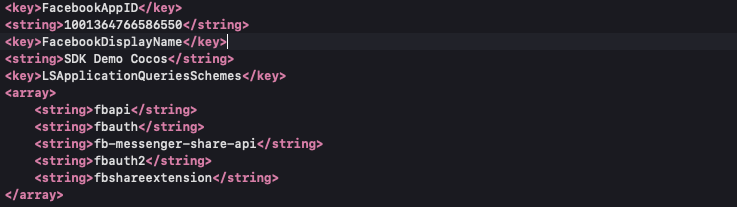
<key>FacebookAppID</key>
<string>APP-ID</string>
<key>FacebookClientToken</key>
<string>CLIENT-TOKEN</string>
<key>FacebookDisplayName</key>
<string>APP-NAME</string>
3. In <array><string> in the key [CFBundleURLSchemes], replace APP-ID with your App ID.
4. In <string> in the key FacebookAppID, replace APP-ID with your App ID.
5. In <string> in the key FacebookClientToken, replace CLIENT-TOKEN with the value found under Settings > Advanced > Client Token in your App Dashboard.
6. In <string> in the key FacebookDisplayName, replace APP-NAME with the name of your app.
7. To use any of the Facebook dialogs (e.g., Login, Share, App Invites, etc.) that can perform an app switch to Facebook apps, your application's Info.plist also needs to include: <dict>...</dict>).
<key>LSApplicationQueriesSchemes</key>
<array>
    <string>fbapi</string>
    <string>fbauth</string>
    <string>fb-messenger-share-api</string>
    <string>fbauth2</string>
    <string>fbshareextension</string>
</array>
Example
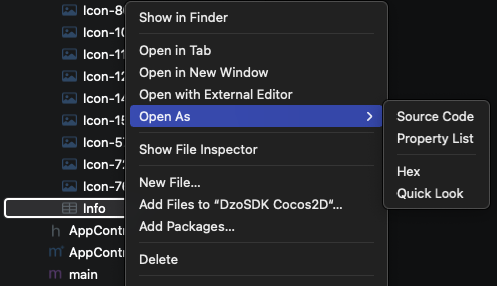
Facebook SDK Demo
<key>FacebookAutoLogAppEventsEnabled</key>
<true/>
<key>FacebookAdvertiserIDCollectionEnabled</key>
<true/>
<key>UIBackgroundModes</key>
<array>
    <string>remote-notification</string>
</array>
<dict>
    <key>CFBundleTypeRole</key>
    <string>Editor</string>
    <key>CFBundleURLSchemes</key>
    <array>
        <string>com.googleusercontent.apps.xxxxxxx-xxxxxxxxxxxxxxxxxx</string>
    </array>
</dict>
<dict>
    <key>CFBundleTypeRole</key>
    <string>Editor</string>
    <key>CFBundleURLSchemes</key>
    <array>
        <string>vn.dzogame.xxxxxx</string>
    </array>
</dict>
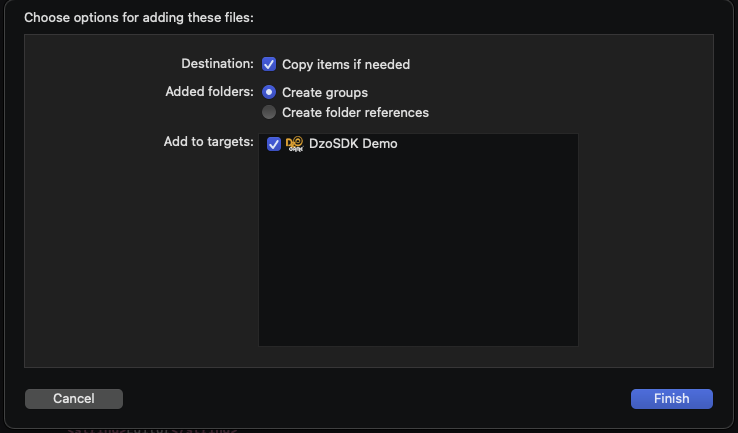
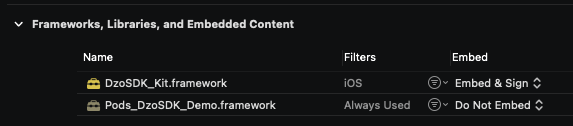
Set Embed = “Embed &Sign”
Copy “dzoconfig.json” to Project Resource
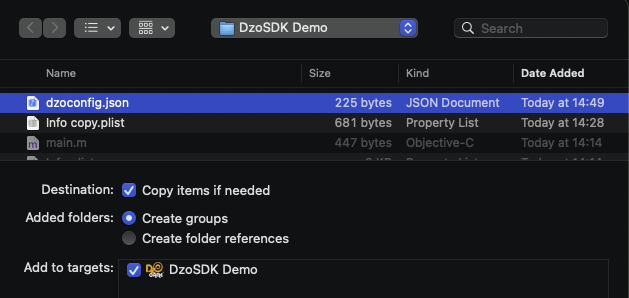
Copy “GoogleService-Info.plist” to Project

Targets / Project IOS
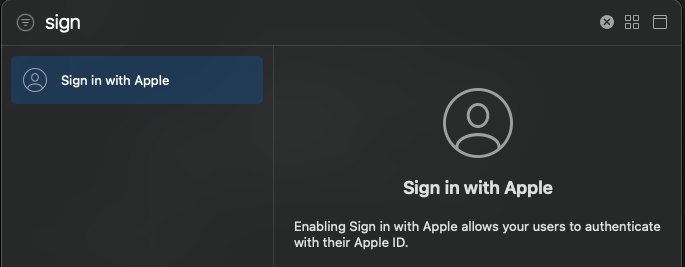
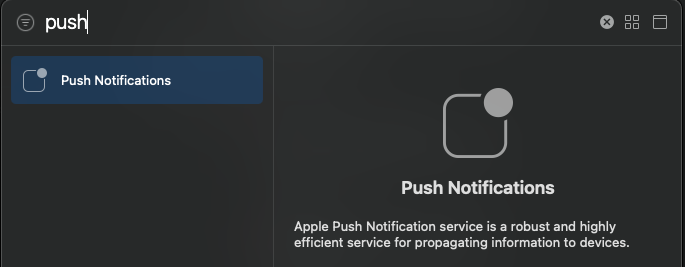
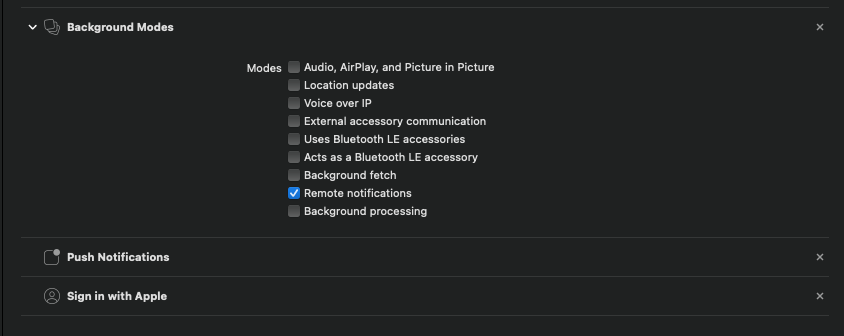
Click + Capability

Add Background modes, Enter
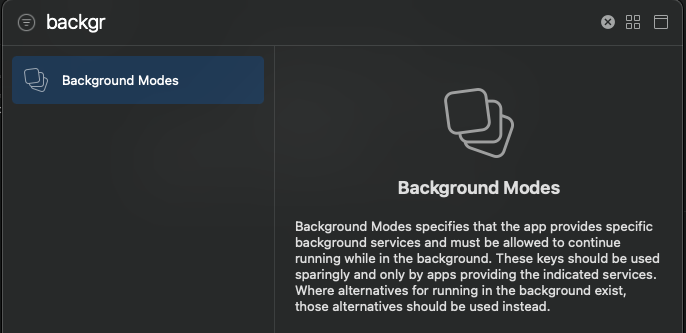
Check Remote notifications
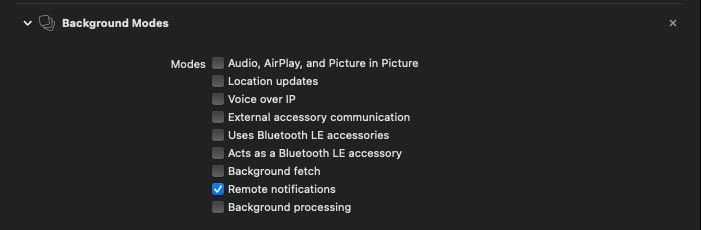
Add Sign in with Apple
Add Push Notification
Final config like this picture
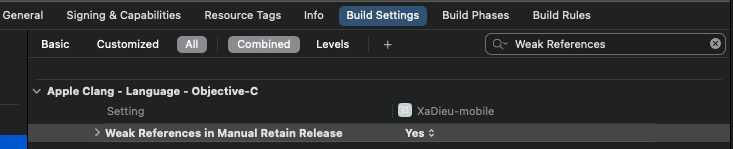
Set Build Settings -> Apple Clang - Language – Objective-C -> Weak References in Manual Retain Release to YES.
AppDelegate Objective-C – Init Connect SDK
Set Environment (Real/Test)
Set Debug mode view (Remove it when release)
Init connect on didFinishLaunchingWithOptions
Show Age Floating Gadget
Import header on AppDelegate
#import
#import

//SDK DZO application instance
- (BOOL)application:(UIApplication *)application didFinishLaunchingWithOptions:(NSDictionary *)launchOptions
{

    //Stepp 1: Define Enviroment : REAL_MOD / TEST_MOD
    [[DZOSDKCoreKit sharedInstance] setEnvironment:TEST_MOD];
    //Step 2: Set Debug view , Don't Open with Release Version
    [[DZOSDKCoreKit sharedInstance] setDebug:true];
    //Step 3 Init Root View
    [[DZOSDKCoreKit sharedInstance] application:application didFinishLaunchingWithOptions:launchOptions];

    //Step 4  Show Floating 18+ Icon
    [[DZOSDKCoreKit sharedInstance] ShowAgeFloating];
    return YES;
}

//SDK DZO openURL sourceApplication
- (BOOL)application:(UIApplication *)application openURL:(NSURL *)url sourceApplication:(NSString *)sourceApplication annotation:(id)annotation
{
    NSLog(@"TAG openURL");
    [[DZOSDKCoreKit sharedInstance] application:application openURL:url
                              sourceApplication:sourceApplication
                                     annotation:annotation];
}
//SDK DZO openURL Referistall
- (BOOL)application:(UIApplication *)application openURL:(NSURL *)url
options:(NSDictionary*)options
{
    NSLog(@"TAG openURL options");
    [[DZOSDKCoreKit sharedInstance] application:application openURL:url
    options:options];
}

//SDK DZO Pushnotification
- (void)application:(UIApplication *)application didReceiveRemoteNotification:(NSDictionary *)userInfo
fetchCompletionHandler:(void (^)(UIBackgroundFetchResult))completionHandler
{
    NSLog(@"TAG didReceiveRemoteNotification");
    [[DZOSDKCoreKit sharedInstance] application:application didReceiveRemoteNotification:userInfo
    fetchCompletionHandler:completionHandler ];
}

//SDK DZO didRegisterForRemoteNotificationsWithDeviceToken
- (void)application:(UIApplication *)application
didRegisterForRemoteNotificationsWithDeviceToken:(NSData *)deviceToken
{
    NSLog(@"TAG didRegisterForRemoteNotificationsWithDeviceToken");
    [[DZOSDKCoreKit sharedInstance] application:application
    didRegisterForRemoteNotificationsWithDeviceToken:deviceToken];
}

//SDK DZO userNotificationCenter
- (void)userNotificationCenter:(UNUserNotificationCenter *)center
willPresentNotification:(UNNotification *)notification
withCompletionHandler:(void (^)(UNNotificationPresentationOptions))completionHandler
{
    NSLog(@"TAG userNotificationCenter willPresentNotification");
    [[DZOSDKCoreKit sharedInstance] userNotificationCenter:center
                                   willPresentNotification:notification
                                     withCompletionHandler:completionHandler];
}
//SDK DZO userNotificationCenter
- (void) userNotificationCenter:(UNUserNotificationCenter *)center
didReceiveNotificationResponse:(UNNotificationResponse *)response
withCompletionHandler:(void(^)(void))completionHandler
{
    NSLog(@"TAG userNotificationCenter didReceiveNotificationResponse");
    [[DZOSDKCoreKit sharedInstance] userNotificationCenter:center
    didReceiveNotificationResponse:response
    withCompletionHandler:completionHandler];
}

//SDK DZO application continueUserActivity
- (BOOL) application:(UIApplication *)application
continueUserActivity:(NSUserActivity *)userActivity
restorationHandler:(void (^)(NSArray *))restorationHandler
{
    NSLog(@"TAG continueUserActivity");
    [[DZOSDKCoreKit sharedInstance] application:application
    continueUserActivity:userActivity
    restorationHandler:restorationHandler];
}

//SDK DZO applicationDidBecomeActive for Appflyer
- (void)applicationDidBecomeActive:(UIApplication *)application {
{
    //Appflyer Config
    [[DZOSDKCoreKit sharedInstance] applicationDidBecomeActive:application];
}
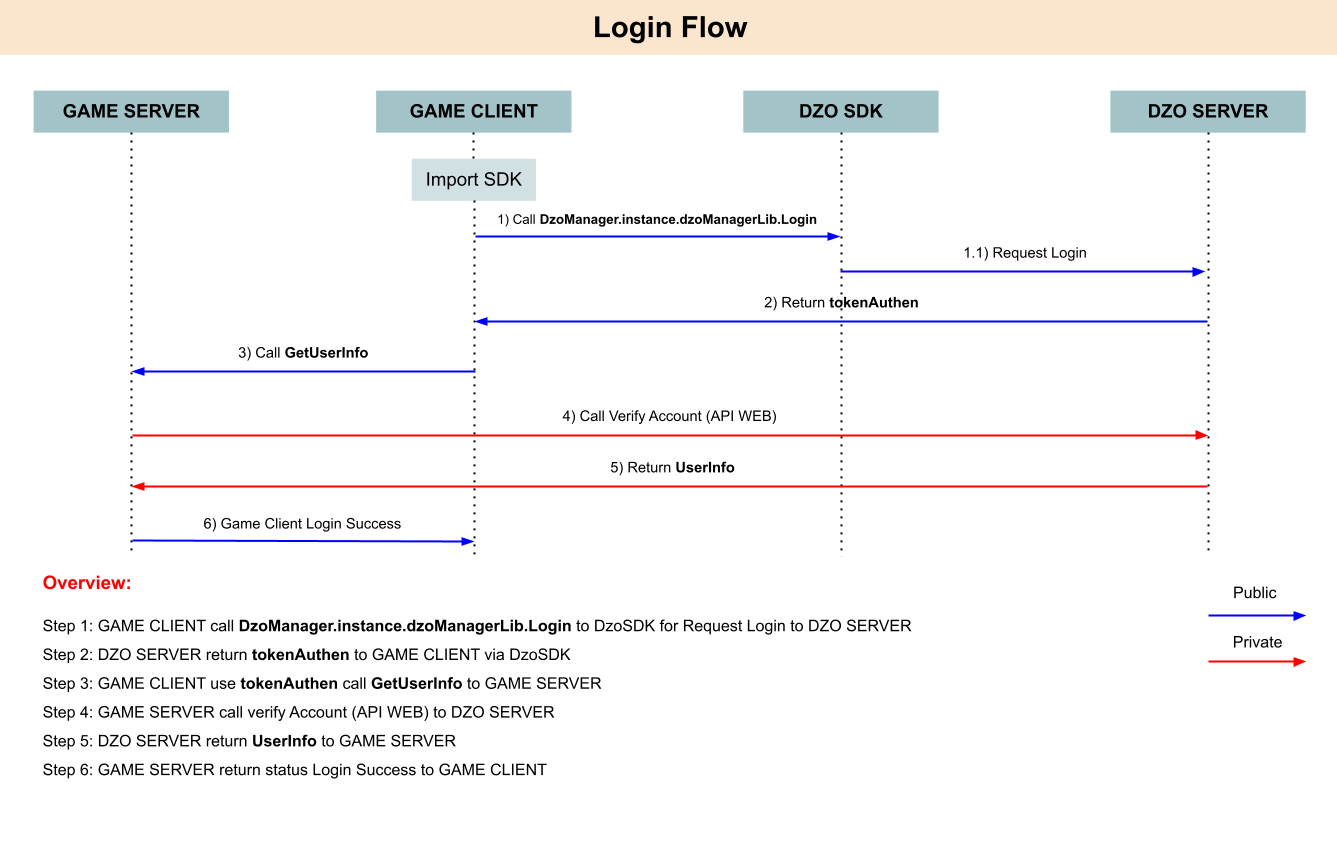
Call DZOSDKCoreKit with Login Process:
[[DZOSDKCoreKit sharedInstance] Login:^(UserInfo *result, NSError *error)
After login Success: Data return
NSNumber *statusAccount; //0: Success, Other is Error
NSString *token; //Token Login when Sucess
Example: For Login Process – Show Dialog
#import <DzoSDK_Kit /DzoPayment.h>
#import <DzoSDK_Kit /DzoLoginView.h>
#import <DzoSDK_Kit /DZOSDKCoreKit.h>

//Show Dialog Login
void DzoUIKit::doLogin()
{
    NSLog(@"doLogin ");
    [[DZOSDKCoreKit sharedInstance] Login:^(UserInfo *result, NSError *error) {
        //Handle Login
        if(error == nil){
            NSLog(@"Account Info 1: Status [%d], tokenSDK: [%@]", result.statusAccount,result.token );
            NSNumber *status =result.statusAccount;
            NSString *token = result.token;
            //Login Sucess, return Token
            if (status==0)
                {
                [[DZOSDKCoreKit sharedInstance] ShowDzoFloating];       //Show Dzo Gadget
                [[DZOSDKCoreKit sharedInstance] ShowAgeFloating];     //Show Age Gadget
                [[DZOSDKCoreKit sharedInstance] ShowBroadcast];         //Show Broadcast

                std::string _token([token UTF8String]);
                loginActionFinished(_token);
            }
            //Login Error, token Null
            else
            {
                NSLog(@"Login Error: %@", status);
            }
        } else {
            NSLog(@"Login Error: %@", error);
        }
    }];
}
After Success Login : Data return Status and Token SDK (statusAccount , token)
Requirement from Game need to show DzoIcon Floating (Gadget) , Aga Floating (Gadget) / Broadcast Message over (ShowDzoFloating, ShowAgeFloating, ShowBroadcast).
[[DZOSDKCoreKit sharedInstance] ShowDzoFloating];       //Show Dzo Gadget
[[DZOSDKCoreKit sharedInstance] ShowAgeFloating];     //Show Age Gadget
[[DZOSDKCoreKit sharedInstance] ShowBroadcast];         //Show Broadcast
To hide Gadget Icon :
[[DZOSDKCoreKit sharedInstance] HideDzoFloating];         //Show Dzo Gadget
[[DZOSDKCoreKit sharedInstance] HideBroadcast];           //Show Age Gadget
[[DZOSDKCoreKit sharedInstance] HideAgeFloating];         //Show Broadcast
Call DZOSDKCoreKit with Logout Process:
[[DZOSDKCoreKit sharedInstance] Logout:^(SDKResult *result, NSError *error)
Example:
//Call logout to switch Account
void DzoUIKit::doLogout()
{
    [[DZOSDKCoreKit sharedInstance] Logout:^(SDKResult *result,    NSError  *error) {
        if(error == nil){
            NSLog(@"Logout Result: [%d], [%@]", result.status.stringValue,result.message );
            //Logout Sucess
            if (result.status==0)
            {
                logoutActionFinished();         //Do logout on Game Screen
            }
            else
            {
                NSLog(@"Login Error: %@", result.status.stringValue);
            }
        } else {
        NSLog(@"Login Error: %@", error);
        }
    }];
}
When logout Success status return =0, Or status is Error
Call DZOSDKCoreKit with Payment Process:
[[DZOSDKCoreKit sharedInstance] Payment:_productID
                                 ItemID:_itemID
                        GameTransaction:_gameTransaction
                           GameServerID:ServerGameID
                                 RoleID:_RoleID
                                handler:^(SDKResult_Payment * result, NSError *  error)
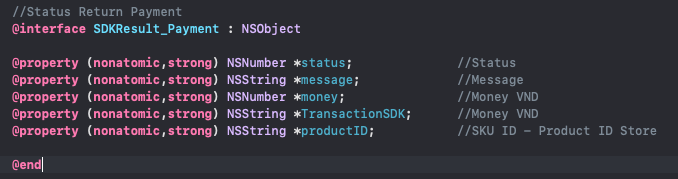
Call back data return with data payment:
Example:
//Process Call IAP Payment
void DzoUIKit::doPayment(std::string productID, std::string itemID, std::string gameTransaction, int ServerGameID, std::string RoleID) {
    NSLog(@"Payement call: %s %s %s %i %s ",productID.c_str(),itemID.c_str(),
    gameTransaction.c_str(),
    ServerGameID,RoleID.c_str());
    NSString* _productID = [NSString stringWithUTF8String:productID.c_str()];
    NSString* _itemID = [NSString stringWithUTF8String:itemID.c_str()];
    NSString* _gameTransaction = [NSString stringWithUTF8String:gameTransaction.c_str()];
    NSString* _RoleID = [NSString stringWithUTF8String:RoleID.c_str()];

    [[DZOSDKCoreKit sharedInstance] Payment:_productID
                                     ItemID:_itemID
                            GameTransaction:_gameTransaction
                               GameServerID:ServerGameID
                                     RoleID:_RoleID
    handler:^(SDKResult_Payment * result, NSError *  error)
    {
        if(error == nil)
        {
            NSLog(@"Payment Result: [%@], [%@]", result.status, result.message );
            //Success
            if (result.status==@0)
            {
                NSString *status_1 = [result.status stringValue];
                std::string status = std::string([status_1 UTF8String]);                            // Status Payment
                std::string message = std::string([result.message UTF8String]);                     // Message
                std::string TransactionSDK = std::string([result.TransactionSDK UTF8String]);       // Transaction SDK
                int money = [result.money  intValue];                                               // Money SDK
                std::string productID = std::string([result.productID UTF8String]);                 // Product ID
                //Return Data to Process on Game Sceeen , this function is Demo
                paymentActionFinished(status,message,TransactionSDK,money,productID);
            }
            else{
                NSLog(@"Payment Error:");
                NSLog(@"Payment Error: %d %@", result.status,  result.message);
            }
        } else {
        NSLog(@"Login Error: %@", error);
        }
    }];
}
//Process to Cocos Screen  Login
void DzoUIKit::loginActionFinished(std::string token)
{
    NSLog(@"loginActionFinished [%@] " , [NSString stringWithUTF8String:token.c_str()]);
    //Call back to HelloWord Screne
    DzoListener::getInstance()->onLoginCompleted(token);
}

//Process to Cocos Screen Logout - Switch Account
void DzoUIKit::logoutActionFinished()
{
    NSLog(@"logoutActionFinished ");
    //Call back to HellowWord Screen
    DzoListener::getInstance()->onLogout();
}

//Process to Cocos Screen Payment sucess
void DzoUIKit::paymentActionFinished(std::string status, std::string msg, std::string transactionID, int money, std::string sku) {
    NSLog(@"paymentActionFinished  [%@] [%@] [%@] [%i] [%@] ",
    [NSString stringWithUTF8String:status.c_str()],
    [NSString stringWithUTF8String:msg.c_str()],
    [NSString stringWithUTF8String:transactionID.c_str()],
    money,
    [NSString stringWithUTF8String:sku.c_str()]
    );
    //Call back to HellowWord Screen over DzoListenner Delegate Object, This can custom by game function, DzoListener is demo delegate.
    DzoListener::getInstance()->onPaymentResult(status, msg, transactionID, money,sku);
}
Call DzoPayment to Process IAP
| Type | Parameter Name | Type | Description |
| Input | productID | NSString | Stock Keeping Unit of this item. Ex: “vn.dzogame.ts_sku_gold01” |
| RoleID | NSString | Game ID (Unique). Ex: “mario01” , “00001”, 1234 | |
| gameTransaction | NSString | Order code, transaction from the game. Ex: “10938093890130192830” | |
| itemID (Option) | NSString | Item from Game Data , ItemName, Item ID | |
| ServerGameID | int | Base on List Server login start (default=0) | |
| Result | status | NSString | 0: Success 1: Error => msg = string Message, transactionID = “”, sku = “” |
| message | NSString | Message result payment | |
| Money | NSNumber | Money return VND by SKU Define | |
| TransactionSDK | NSString | Transaction SDK return – IAP Transaction | |
| ProductID | NSString | Product SKU return |
To Active tracking Event Firebase, or Appflyer you can config on dzoconfig.json.
useFirebaseTracking, useAppsFlyerTracking
1: Active
0: Deactive
To call Method for tracking event :
- (void) TrackEventGame_ScreenView:(NSString *)ScreenName;
Example: At Lobby PVP , Dungeon
[[DZOSDKCoreKit sharedInstance] TrackEventGame_ScreenView:@"Lobby_PVP"];
[[DZOSDKCoreKit sharedInstance] TrackEventGame_ScreenView:@"Dungeon_1"];
- (void) TrackEventGame_LevelAchieved:(int)level;
Exaple: User level up 1,5,10
[[DZOSDKCoreKit sharedInstance] TrackEventGame_LevelAchieved:1];
[[DZOSDKCoreKit sharedInstance] TrackEventGame_LevelAchieved:5];
[[DZOSDKCoreKit sharedInstance] TrackEventGame_LevelAchieved:10];
- (void) TrackEventGame_CompleteRegistration:(NSString *)content;
Example: Start_Update, End_Update, Create_Char
[[DZOSDKCoreKit sharedInstance] TrackEventGame_CompleteRegistration:@"Start_Update"];
[[DZOSDKCoreKit sharedInstance] TrackEventGame_CompleteRegistration:@"End_Update"];
[[DZOSDKCoreKit sharedInstance] TrackEventGame_CompleteRegistration:@"Create_Charater"];
- (void) TrackEventGame_CompleteTutorial:(NSString *)content;
Example: Compleate Tutorial_1
[[DZOSDKCoreKit sharedInstance] TrackEventGame_CompleteTutorial:@"Tutorial_1"];
- (void) TrackEventGame_AchievementUnlocked:(NSString *)content;
Example: Open First LootBox, Clear Finish Dungeron red
[[DZOSDKCoreKit sharedInstance] TrackEventGame_AchievementUnlocked:@"Open_First_Lootbox"];
[[DZOSDKCoreKit sharedInstance] TrackEventGame_AchievementUnlocked:@"Final_Dungeon_Red"];
- (void) TrackEventGame_ReEngagements:(NSString *)content;
Example: User Click Event Icon, Click Shop Event icon
[[DZOSDKCoreKit sharedInstance] TrackEventGame_ReEngagements:@"Open_Event_Icon"];
[[DZOSDKCoreKit sharedInstance] TrackEventGame_ReEngagements:@"Open_Shop_Event"];
- (void) TrackEventGame:(NSString *)eventvalue;
Example: some info need to track with simple name
[[DZOSDKCoreKit sharedInstance] TrackEventGame:@"Custom_info_1"];
[[DZOSDKCoreKit sharedInstance] TrackEventGame:@"Custom_info_2"];