DzoSDK Document
English
2022-01-27DzoSDK Android Native v.2.12
Copy DzoSDK-release.aar to folder {Project}/app/libs
Add to dependencies of build.grade(Module.app)
dependencies {
…
// --- DzoSDK Library --- //
implementation 'com.android.volley:volley:1.2.1'
implementation group: 'com.google.code.gson', name: 'gson', version: '2.8.6'
implementation 'com.facebook.android:facebook-login:11.1.1'
implementation 'com.squareup.picasso:picasso:2.71828'
implementation 'com.google.android.gms:play-services-auth:20.0.0'

implementation "com.android.billingclient:billing:3.0.0"
implementation 'com.appsflyer:af-android-sdk:6.5.0'

implementation platform('com.google.firebase:firebase-bom:29.0.3')
implementation 'com.google.firebase:firebase-analytics'
implementation 'com.google.firebase:firebase-messaging'
// ------------------------- //
…
}

apply plugin: 'com.google.gms.google-services'  // --- Add this at bottom ---
buildscript {
    repositories {
    google()
    mavenCentral()
    }
    dependencies {
    classpath 'com.android.tools.build:gradle:7.2.0-alpha06'

    // NOTE: Do not place your application dependencies here; they belong
    // in the individual module build.gradle files
    classpath 'com.google.gms:google-services:4.3.10' // google-services plugin
    }
}

allprojects {
    repositories {
    google()
    mavenCentral()
    }
}
dependencies {
…
// --- DzoSDK Library --- //
implementation 'com.android.volley:volley:1.2.1'
implementation group: 'com.google.code.gson', name: 'gson', version: '2.8.6'
implementation 'com.facebook.android:facebook-login:11.1.1'
implementation 'com.squareup.picasso:picasso:2.71828'
implementation 'com.google.android.gms:play-services-auth:20.0.0'

implementation "com.android.billingclient:billing:3.0.0"
implementation 'com.appsflyer:af-android-sdk:6.5.0'

implementation platform('com.google.firebase:firebase-bom:29.0.3')
implementation 'com.google.firebase:firebase-analytics'
implementation 'com.google.firebase:firebase-messaging'
// ------------------------- //
…
}

apply plugin: 'com.google.gms.google-services'  // --- Add this at bottom ---
Add to dependencies of build.grade(Project)
buildscript {
    repositories {
    google()
    mavenCentral()
    }
    dependencies {
    classpath 'com.android.tools.build:gradle:7.2.0-alpha06'

    // NOTE: Do not place your application dependencies here; they belong
    // in the individual module build.gradle files
    classpath 'com.google.gms:google-services:4.3.10' // google-services plugin
    }
}

allprojects {
    repositories {
    google()
    mavenCentral()
    }
}
Add a Firebase configuration file
Move config file (google-services.json) into the module (app-level) directory of your app ({Project}/app/)
Config file strings.xml (as example) in folder {Project}/app/src/main/res/values
<resources>
    …
    <string name="app_name">{YOUR_APPNAME}</string> <!-- Ex: Demo App -->
    <string name="DzoSDKServer">0</string>  <!-- 0 : Server Test | 1 : Server Real-->
    <string name="publicKeyTest">{YOUR_PUBLICKEY_TEST}</string> <!-- public key use for Server Test -->
    <string name="publicKeyReal">{YOUR _PUBLICKEY_REAL}</string> <!-- public key use for Server Real -->
    <string name="serviceID">{YOUR SERVICE ID}</string>
    <string name="useDefaultButtonDzoHome">1</string> <!-- 0 : FALSE | 1 : TRUE -->
    <string name="useDefaultTag18Plus">1</string> <!-- 0 : FALSE | 1 : TRUE -->
    <string name="useDefaultBroadcast">1</string> <!-- 0 : FALSE | 1 : TRUE -->
    <string name="facebook_app_id">{YOUR FB APP ID}</string> <!-- Ex: 123456 -->
    <string name="fb_login_protocol_scheme">fb{YOUR FB APP ID} </string> <!-- Ex: fb123456 -->
    <string name="fb_ContentProvider">com.facebook.app.FacebookContentProvider{YOUR FB APP ID}</string> <!-- Ex: com.facebook.app.FacebookContentProvider123456-->
    <string name="google_web_client_id">{YOUR GOOGLE WEB CLIENT ID}</string>

    <string name="useAppsFlyerTracking">1</string> <!-- 0 : FALSE | 1 : TRUE -->
    <string name="AppsFlyer_DevKey">{AppsFlyer_DevKey}</string>

    <string name="useFirebaseTracking">1</string> <!-- 0 : FALSE | 1 : TRUE -->
    <string name="firebase_default_notification_channel_id">{BundleID}.urgent</string> <!-- Ex: com.test.app.urgent -->
    ...
</resources>
Add code into function onActivityResult() in your Activity.
Example:
…
@Override
protected void onActivityResult(int requestCode, int resultCode, Intent data) {
    Log.d(DzoSDK.TAG, "onActivityResult >>> requestCode:" + requestCode + " | resultCode: " + resultCode);
    super.onActivityResult(requestCode, resultCode, data);
    …
    DzoSDK.GetInstance().OnActivityResult(requestCode, resultCode, data); // <== Add this code
}
…
In Function onCreate() of Activity add this code to Init DzoSDK:
@Override
protected void onCreate(Bundle savedInstanceState) {
super.onCreate(savedInstanceState);
setContentView(R.layout.layout_login);

// ------ Init DzoSDK ------- //
if(!DzoSDK.GetInstance().IsInitialized()){
    DzoSDK.GetInstance().Init(this, new DzoInitCallback() {
    @Override
    public void OnLoginSuccess() { // Callback Login Successful, change NEXT SCENE
    // --- Login Successful --- //
    // … Your code … //
}

@Override
public void OnDisconnect() { // Callback Disconnect SDK, SDK auto logout your account and you need to change LoginActivity
    // --- Disconnect From SDK --- //
    // … Your code … //
}
}
});

DzoSDK.GetInstance().Connect();
}
DzoSDK.GetInstance().ShowPopupLogin(); // <== Method show Popup Login
// -------------------------- //

// … Your code … //
}
Method:
public void Logout(DzoLogOutCallback _callback)
Example:
...
DzoSDK.GetInstance().LogOut(new DzoLogOutCallback() {
    @Override
    public void callbackOnSuccess() {
        // --- Logout Successful --- //
        // … Your code … //
    }
    @Override
    public void callbackOnError(int _code, String _msg) {
        // --- Logout Error --- //
        // … Your code … //
    }
});
...
Flow:
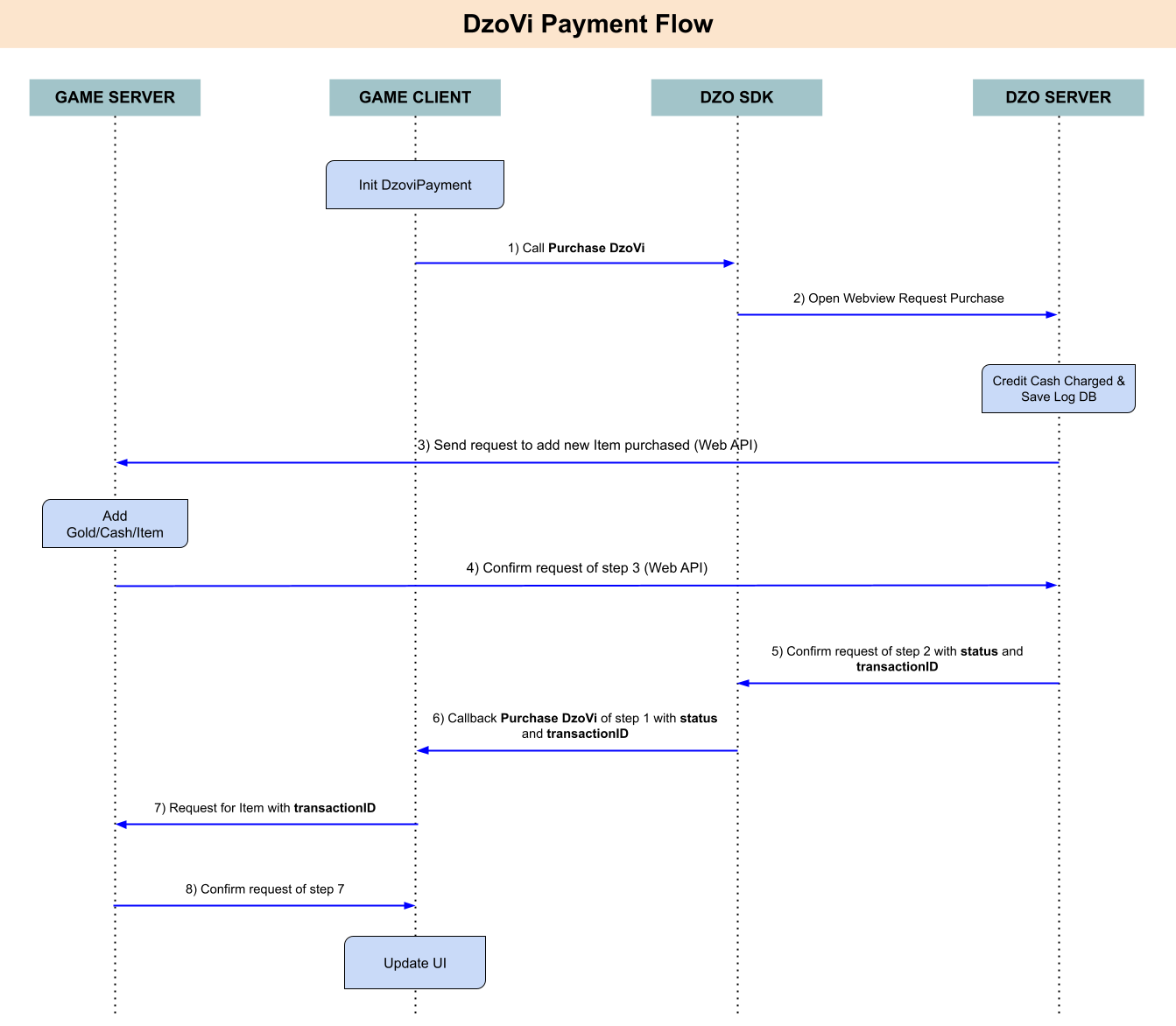
Note: You can’t pay if you login by Guest.
Method :
DzoSDK.GetInstance().PurchaseDzoViProduct(String _sku, String _itemID, String _roleID, String _gameTransaction, DzoViPayCallback _callback)
| Type | Parameter Name | Type | Description |
| Input | sku | string | Stock Keeping Unit of this item. Ex: “vn.dzogame.ts_sku_gold01” |
| itemID | string | ID of Item in your game. Ex: “sword01” | |
| roleID | string | UserID in in game. Ex: “User123456” | |
| gameTransaction | string | Order code, transaction from the game. Ex: “10938093890130192830” | |
| Result | status | string |
0: Success
1: Error => msg = string Message, transactionID = “”, sku = “” |
| msg | string | Message result payment | |
| transactionID | string | Purchase Transaction ID | |
| sku | string | Stock Keeping Unit of this item | |
| gameTransaction | string | Your gameTransaction that you input |
Example:
DzoSDK.GetInstance().PurchaseDzoViProduct(_sku, _itemID, _roleID, _gameTransaction, new DzoViPayCallback() {
@Override
    public void callbackResult(int _status, String _msg, String _transactionID, String _sku, String _gameTransaction) {
        Log.d(DzoSDK.TAG, "Result ViDzoPay status: " + _status + " | msg: " + _msg + " | transactionID: " + _transactionID
        + " | sku: " + _sku + " | gameTransaction: " + _gameTransaction);
        if (_status == 0) { // Purchase Successful
            // --- YOUR CODE --- //
        }else{ // Error
            // --- YOUR CODE --- //
        }
    }
});
Flow:
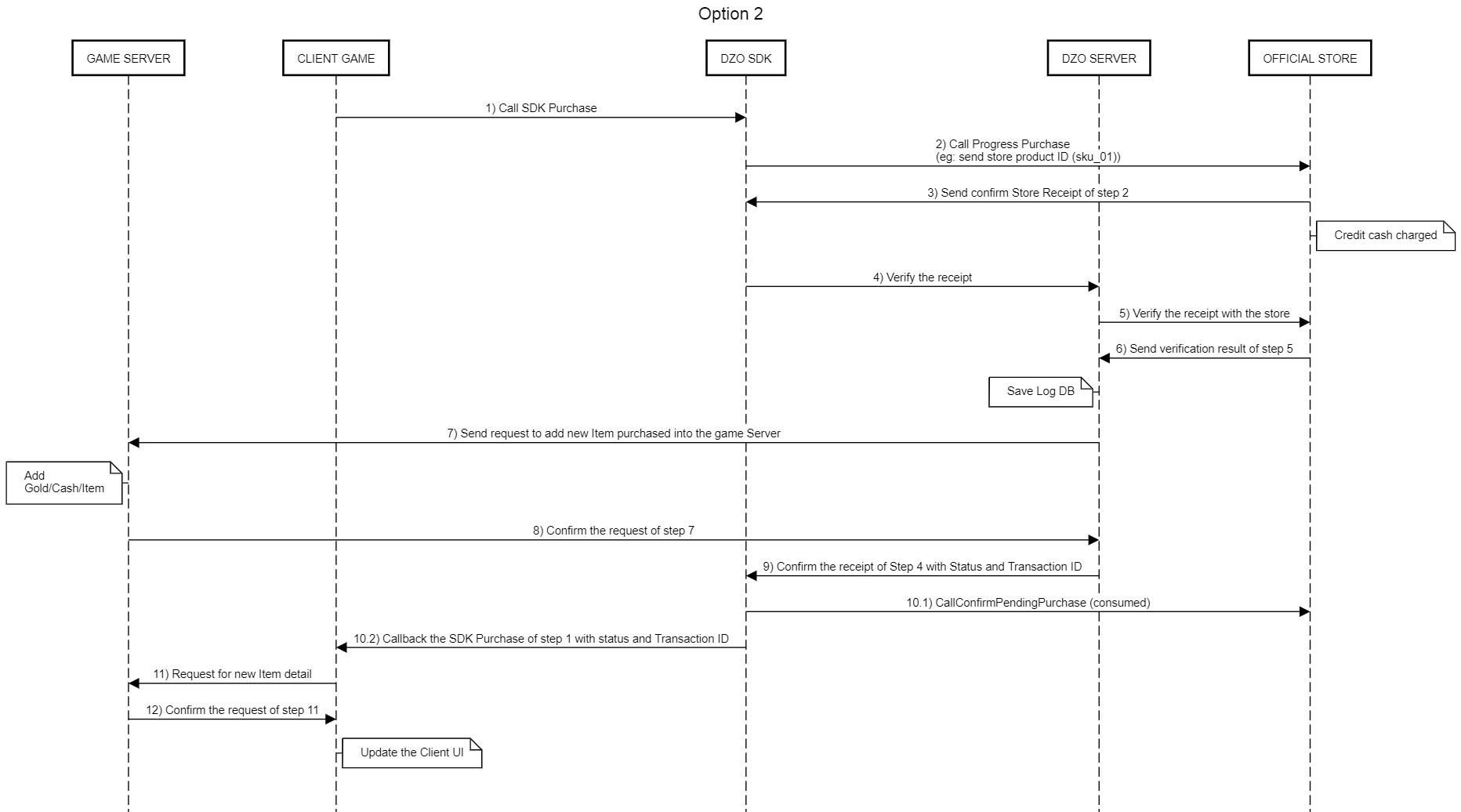
Create list IAPProduct and add them into list;
Constructor: new IAPProduct (String _sku, String _itemID, DzoSDK.ProductType _productType)
Note: productType include 3 options: ConsumableItem, Non_Consumable and Subscription. See more at: https://developer.android.com/google/play/billing/terminology for detail
Example:
ArrayList<IAPProduct> _listIAPProduct = new ArrayList<IAPProduct>();
_listIAPProduct.add(new IAPProduct(“skutest_20k_vnd”,"Item01",DzoSDK.ProductType.Consumable));
_listIAPProduct.add(new IAPProduct(“skutest_20k_vnd”,"Item02",DzoSDK.ProductType.Consumable));
_listIAPProduct.add(new IAPProduct(“skutest_50k_vnd”,"Item03",DzoSDK.ProductType.Consumable));
_listIAPProduct.add(new IAPProduct(“skutest_50k_vnd”,"Item04",DzoSDK.ProductType.Consumable));

InitIAPProductsToSDK(_listIAPProduct);

private void InitIAPProductsToSDK(ArrayList<IAPProduct> _listIAPProduct){
    IAPManager.GetInstance().InitProducts(_listIAPProduct, new DzoIAPInitProductsCallback() {
        @Override
        public void callbackOnResult(boolean _isSuccess, int _errorCode) {
            if(_isSuccess){
            Log.d(DzoSDK.TAG, ">>> InitProducts Successful");
            }else{
            Log.e(DzoSDK.TAG, ">>> InitProducts Failed, errorCode: : " + _errorCode);
            // --- You can call Re-InitProducts again --- //
            InitIAPProductsToSDK(_listIAPProduct);
            }
        }
    });
}
Method:
IAPManager.GetInstance().Purchase(String _sku, String _itemID, String _roleID, String _gameTransaction, DzoIAPPurchaseCallback _callback)
| Type | Parameter Name | Type | Description |
| Input | sku | string |
Stock Keeping Unit of this item.
Ex: “skutest_20k_vnd” |
| itemID | string |
ID of Item in your game.
Ex: “sword01” |
|
| roleID | string |
UserID in in game.
Ex: “User123456” |
|
| gameTransaction | string |
Order code, transaction from the game.
Ex: “10938093890130192830” |
|
| Result | status | enum |
0: Success
-999: Error Process To Server -100: Error Process To Store - 99: Check Logic Error 200: Success Payment OtherAccount |
| money | string | ||
| transactionID | string | Purchase Transaction ID | |
| sku | string | Stock Keeping Unit of this item | |
| lastHashID | string | ||
| paymentResendData | object |
In-App Purchase Success but verify to server error. You must save this receiptData and re-send to server. See more at function VerifyIAPPay (!= null when status = -999)
|
Example:
IAPManager.GetInstance().Purchase(_sku, _itemID, _roleID, _gameTransaction, new DzoIAPPurchaseCallback() {
    @Override
    public void callbackOnResult(Result _result) {
        if(_result.status == Result.Status.Success){
            Log.d(DzoSDK.TAG, ">>> Pay Success --- money: " + _result.money
            + " | transactionID: " + _result.transactionID + " | sku: " + _result.sku + " | lastHashID: " + _result.lastHashID);
        }else if(_result.status == Result.Status.Success_Payment_OtherAccount){
            Log.d(DzoSDK.TAG, ">>> Pay Success_Payment_OtherAccount --- money: " + _result.money
            + " | transactionID: " + _result.transactionID + " | sku: " + _result.sku + " | lastHashID: " + _result.lastHashID);
        }else if(_result.status == Result.Status.CheckLogicError){
            Log.d(DzoSDK.TAG, ">>> Call method error: --- errorCode: " + _result.errorCode);
        }else if(_result.status == Result.Status.ErrorProcessToStore){
            Log.d(DzoSDK.TAG, ">>> Process to Store error: --- errorCode: " + _result.errorCode);
        }else{ // In-App Success but verify to server error. You must save this receiptData and re-send to server
            Log.e(DzoSDK.TAG, ">>> In-App Purchase Success but verify to server error. You must save this receiptData and re-send to server.\nsku: " + _result.paymentResendData.sku + " | itemID: " + _result.paymentResendData.itemID  + " | roleID: " + _result.paymentResendData.roleID + " | gameTransaction: " + _result.paymentResendData.gameTransaction
            + " | errorCode" + _result.errorCode + " | jsonStringPayment: " + _result.paymentResendData.jsonStringPayment);
        }
    }
});
Incase In-App Success but verify to server error. You must save this receiptData and re-send to server. You can call method to re-send error payment:
DzoSDK.GetInstance().VerifyIAPPay(paymentResendData.jsonStringPayment, paymentResendData.sku, paymentResendData.itemID, paymentResendData.roleID, paymentResendData.gameTransaction, DzoIAPPurchaseCallback _callback)
Example:
DzoSDK.GetInstance().VerifyIAPPay(paymentResendData.jsonStringPayment, paymentResendData.sku, paymentResendData.itemID, paymentResendData.roleID, paymentResendData.gameTransaction, new DzoIAPPurchaseCallback() {
    @Override
    public void callbackOnResult(Result _result) {
        if(_result.status == Result.Status.Success){
            Log.d(DzoSDK.TAG, ">>> Pay Success --- money: " + _result.money
            + " | transactionID: " + _result.transactionID + " | sku: " + _result.sku + " | lastHashID: " + _result.lastHashID);
            }else if(_result.status == Result.Status.Success_Payment_OtherAccount){
            Log.d(DzoSDK.TAG, ">>> Pay Success_Payment_OtherAccount --- money: " + _result.money
            + " | transactionID: " + _result.transactionID + " | sku: " + _result.sku+ " | lastHashID: " + _result.lastHashID);
        }else if(_result.status == Result.Status.CheckLogicError){
            Log.d(DzoSDK.TAG, ">>> Call method error: --- errorCode: " + _result.errorCode);
            }else if(_result.status == Result.Status.ErrorProcessToStore){
            Log.d(DzoSDK.TAG, ">>> Process to Store error: --- errorCode: " + _result.errorCode);
            }else{ // In-App Success but verify to server error. You must save this receiptData and re-send to server
            Log.e(DzoSDK.TAG, ">>> In-App Purchase Success but verify to server error. You must save this receiptData and re-send to server.\nsku: " + _result.paymentResendData.sku + " | itemID: " + _result.paymentResendData.itemID  + " | roleID: " + _result.paymentResendData.roleID + " | gameTransaction: " + _result.paymentResendData.gameTransaction
            + " | errorCode" + _result.errorCode + " | jsonStringPayment: " + _result.paymentResendData.jsonStringPayment);
        }
    }
});
Flow:
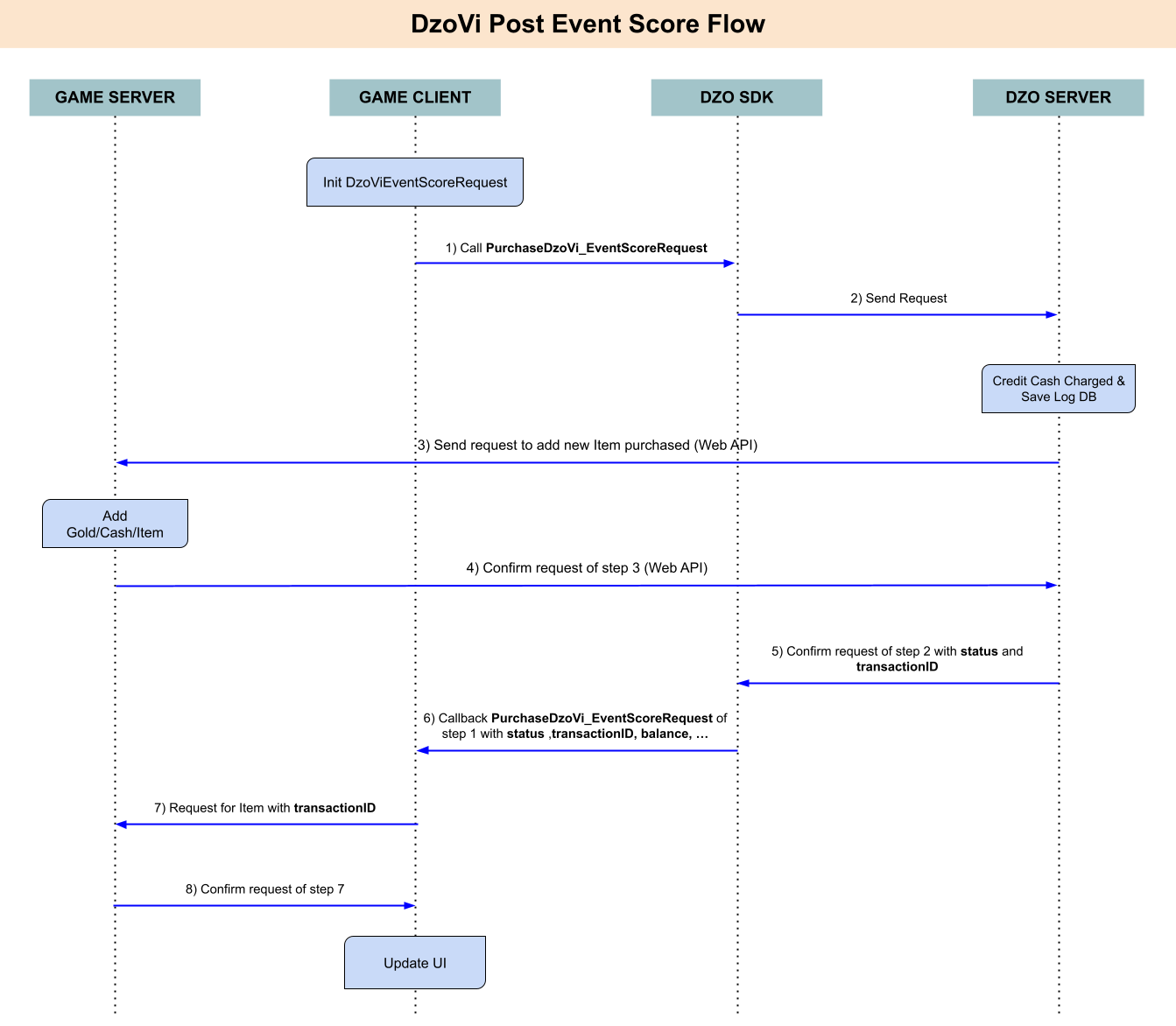
Introduction:
You can buy item by DzoDong in your DzoVi. (Note: You can’t use DzoDong if you login by Guest)
To get DzoDong you can call method:
long _dzoDong = DzoSDK.GetInstance().GetDzoDong();
And you can update your DzoDong when it has changed by registering callback:
DzoSDK.GetInstance().RegisCallbackUpdateDzoDong(new DzoDongUpdateCallback() {
@Override
    public void callbackResult(long _dzoDongUpdate) {
        Log.d(DzoSDK.TAG, "Your dzoDong: " + _dzoDongUpdate);
    }
});
Method Purchase:
DzoSDK.GetInstance().PurchaseDzoVi_EventScoreRequest(String _sku, String _itemID, String _roleID, String _gameTransaction, DzoViPayCallback _callback)
| Type | Parameter Name | Type | Description |
| Input | sku | string | Stock Keeping Unit of this item. Ex: “skutest_20k_vnd” |
| itemID | string | ID of Item in your game. Ex: “sword01” | |
| roleID | string | UserID in in game. Ex: “User123456” | |
| gameTransaction | string | Order code, transaction from the game. Ex: “10938093890130192830” | |
| Result | status | string |
0: Success
Other: Error |
| msg | string |
Message result payment
Ex: “Successful” |
|
| price | int |
Price of Item
Ex: 20000 |
|
| balance | long |
Update your DzoDong
Ex: 89000 |
|
| transactionID | string |
Purchase Transaction ID
Ex: “123456” |
|
| sku | string |
Stock Keeping Unit of this item Ex: “skutest_20k_vnd” |
|
| gameTransaction | string | Your gameTransaction that you input |
Example:
DzoSDK.GetInstance().PurchaseDzoVi_EventScoreRequest(_sku, _itemID, _roleID, _gameTransaction, new DzoVi_EventScoreRequest_Callback() {
    @Override
    public void callbackResult(int _status, String _msg, int _price, long _balance, String _transactionID, String _sku, String _gameTransaction) {
        Log.d(DzoSDK.TAG, "Result ViDzoPay Event status: " + _status + " | msg: " + _msg + " | price: " + _price + " | balance: " + _balance + " | transactionID: " + _transactionID
        + " | sku: " + _sku + " | gameTransaction: " + _gameTransaction);
        if (_status == 0) { // Purchase Successful
        // --- YOUR CODE --- //
        Toast.makeText(ShopActivity.this, "Successful", Toast.LENGTH_SHORT).show();
        }else{ // Error
        // --- YOUR CODE --- //
        Toast.makeText(ShopActivity.this, "Failed [" + _status + "]", Toast.LENGTH_SHORT).show();
        }
    }
});
Method:
public void TrackEventGame(String _eventName, Hashtable _paramater)
Example:
Track Logout Event:
DzoSDK.GetInstance().TrackEventGame("LogOut", null);
Method:
public void TrackEventGame_ScreenView(String _screenName)
Example:
DzoSDK.GetInstance().TrackEventGame_ScreenView("Shop");
Method:
public void TrackEventGame_LevelAchieved(int _level)
Example:
DzoSDK.GetInstance().TrackEventGame_LevelAchieved(10);
Method:
public void TrackEventGame_CompleteRegistration()
Example:
DzoSDK.GetInstance().TrackEventGame_CompleteRegistration();
Method:
public void TrackEventGame_CompleteTutorial(String _content)
Example:
DzoSDK.GetInstance().TrackEventGame_CompleteTutorial(“”);
Method:
public void TrackEventGame_AchievementUnlocked(String _content)
Example:
DzoSDK.GetInstance().TrackEventGame_AchievementUnlocked(“First Blood”);
Method:
public void TrackEventGame_ReEngagements(String _content)
Example:
DzoSDK.GetInstance().TrackEventGame_ReEngagements(“Click Button Shop”);
You can call method after login successful.
Method:
public void ShowBroadcast()
Example:
DzoSDK.GetInstance().ShowBroadcast();
You can call method after login successful, and you need add this code in string.xml
<string name="fb_ContentProvider">com.facebook.app.FacebookContentProvider{YOUR FB APP ID}</string>
Method:
public void FBSharePhoto(byte[] _bytes, DzoFBSharePhotoCallback _callback)
Example:
byte[] _bitmapdata = {...};

DzoSDK.GetInstance().FBSharePhoto(_bitmapdata, new DzoFBSharePhotoCallback() {
    @Override
    public void callbackResult(Status _result, int _code, String _msg) {
        if(_result == Status.Success){
            // - Your Code - //
            Log.d(DzoSDK.TAG, ">>> FB Share Photo | msg: " + _msg + " | code: " + _code);
        }else if(_result == Status.Cancel){
        // - Your Code - //
            Log.d(DzoSDK.TAG, ">>> FB Share Photo | msg: " + _msg + " | code: " + _code);
        }else{
            // - Your Code - //
            Log.e(DzoSDK.TAG, ">>> FB Share Photo | msg: " + _msg + " | code: " + _code);
        }
    }
});