DzoSDK Document
English
2022-02-25DzoSDK Unity Mobile v.2.12
| DATE | VERSION | DESCRIPTION |
| 2019/04/01 | 0.0.1 | Login DzoID, Guest, Facebook |
| 2019/10/15 | v2.7 | Login Google, Payment Verify Update |
| 2020/02 | V2.10 |
Login AppleID
Update Voice Chat |
| 2021/03/23 | V.2.11 | Update Facebook SDK 9.0 |
| 2021/03/24 | V.2.12 |
Track Event Game
Update Google Billing v3 |
| 2022/02/09 | V.2.12 |
Add AppsFlyer
Config Tracking Firebase Add feature DzoVi Payment Add feature DzoVi Event Score Request |
Method:
public void Init(System.Action _onInitSuccess, System.Action _onDisconnectFromSDK)
Example:
DzoManager.instance.Init(
    ()=>{
        // --- Callback when Init SDK Successfully --- //
        // Recommend: Call SDK Login after that
        // --- YOUR CODE --- //
    }
    , ()=>{
        // --- Callback when disconnect from SDK --- //
        // --- YOUR CODE --- //
        // Recommend: back to scene Login and show Popup Login and stop showing broadcast
        DzoManager.instance.dzoManagerLib.ShowLoginUI();  // show Popup Login
        DzoManager.instance.StopIEBroadcast(); // stop showing broadcast
        ….
});
After Init SDK successfully, you can call Login method.
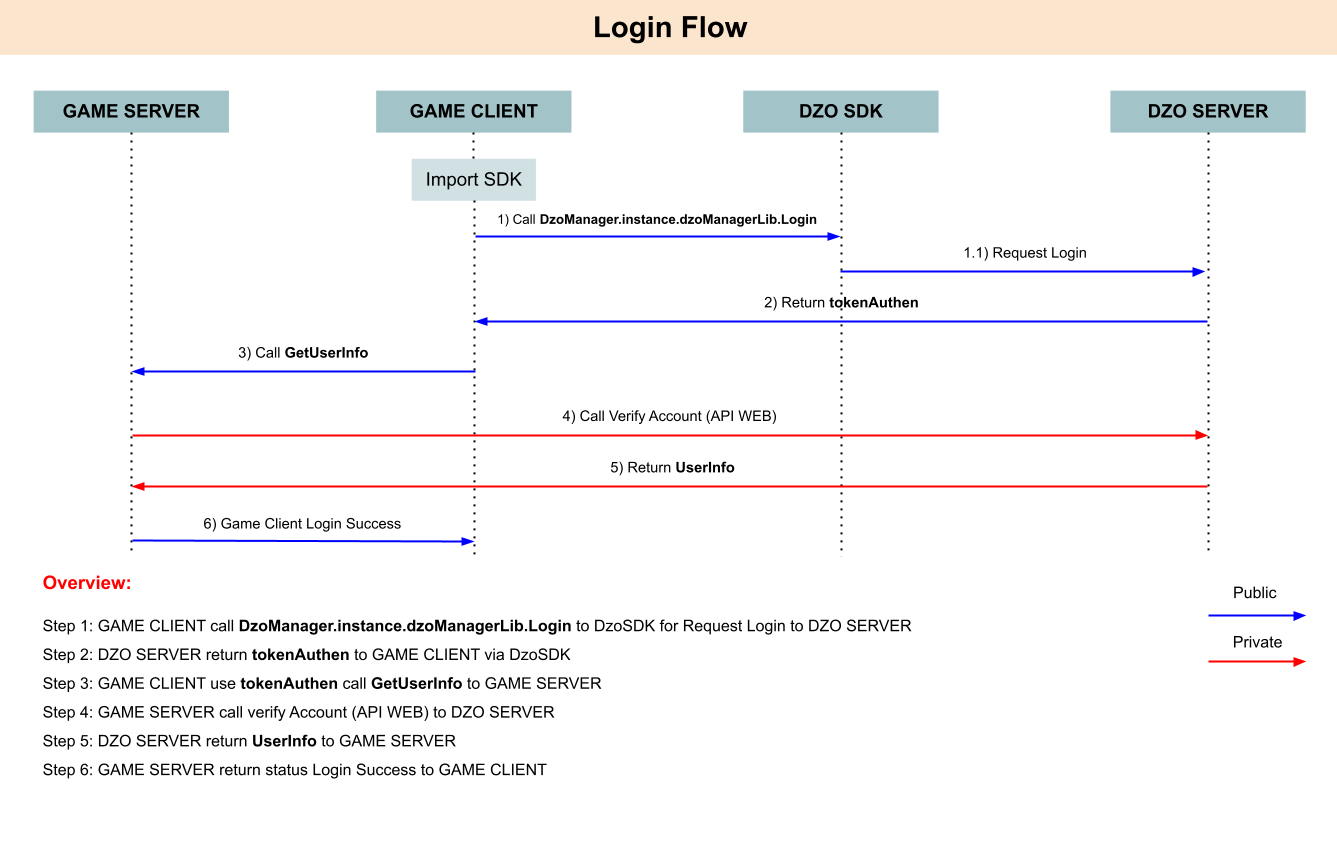
Method:
public void Login(HandleToken _handle)

public delegate void HandleToken(DzoResultStatus _status, string _token, string _error = "");

public enum DzoResultStatus
{
    Success = 0,
    Fail = 1,
    Error = 2,
    NeedUpdateProfile = 3,
    NotEnoughAge = -973,
};
Example:(see script DemoIAP.cs for details)
DzoManager.instance.dzoManagerLib.Login((status, usetoken, error) =>
{
    if (status == Dzo.DzoManagerLib.DzoResultStatus.Success) // => Callback when Login Successfully
    {
        Debug.Log("UseToken: " + usetoken + " | maxtoken: " + usetoken.Length);
        DzoManager.instance.ShowAlert("Đăng nhập thành công.");//Show Alert from Dzo

        DzoManager.instance.dzoManagerLib.ShowDzoFloating();
        DzoManager.instance.dzoManagerLib.ShowBroadcast();
        DzoManager.instance.dzoManagerLib.SendRequestTrackingAppPing();

        // --- YOUR CODE --- //
        // Recommend: After Login Successfully, you need to call:
        // - InitIAPPurchase, InitDzoViPayment (Optional), InitDzoViEventScoreRequest (Optional)
    }
    else // => Callback when Login Failed
    {
        Debug.LogError("SDKHandleLogin fail. Detail: " + error);
    }
});
Method:
public void SetServerGameID(string _id)
Example:
DzoManager.instance.dzoManagerLib.SetServerGameID("1"); // => Set Server Game ID
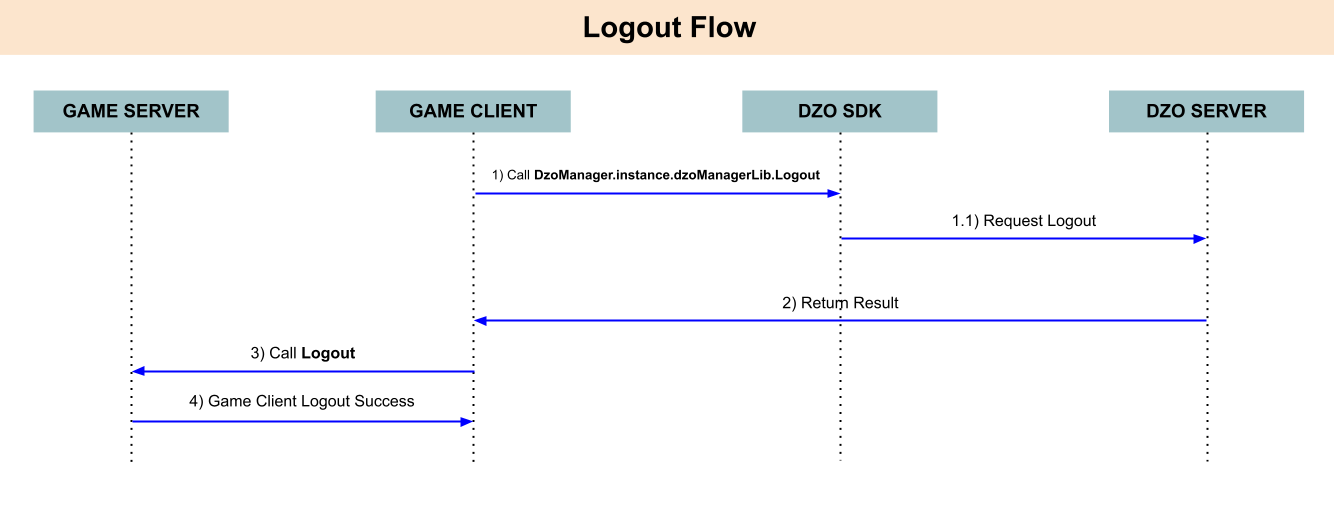
Example:(see script DemoIAP.cs for details)
DzoManager.instance.dzoManagerLib.LogOut(()=>{
    // Logout From DzoServer Successful => Call Logout to GameServer
    // --- TODO - YOUR CODE --- //
});
After Login successfully, you can call method InitIAPPurchase.
Method:
public void InitIAPPurchase(List _products, Dzo.DzoManagerLib.CallbackIAPPurchase _callback)

public class DzoInAppProduct
{
    public UnityEngine.Purchasing.ProductType productType;
    public string defaultID, skuApple, skuAndroid, itemID;
    public DzoInAppProduct(string _defaultID, string _skuApple, string _skuAndroid, UnityEngine.Purchasing.ProductType _productType, string _itemID = "")
    {
        productType = _productType;
        defaultID = _defaultID;
        skuApple = _skuApple;
        skuAndroid = _skuAndroid;
        ItemID = _itemID;
    }
}
public delegate void CallbackIAPPurchase(int _status, string _purchaseData, string _money, string _transactionID, string _sku, string _itemID, string _gameTransaction);
| Type | Parameter Name | Type | Description |
| Callback | status | int |
0: Success
-999: Error Process To Server -100: Error Process To Store - 99: Check Logic Error 200: Success Payment OtherAccount |
| purchaseData | string | Json of Receipt when you purchase to Store (Google Store/AppleStore) successfully. (See in IAPManager.cs for details) | |
| money | string |
Price of Item in Store (Google Store/AppleStore)
Ex: “20000” |
|
| transactionID | string |
Purchase Transaction ID
Ex: “GPA.3347-6520-4658-38421” |
|
| sku | string |
Stock Keeping Unit of this item.
Ex: “skutest_20k_vnd” |
|
| itemID | string |
ID of Item in your game.
Ex: “sword01” |
|
| gameTransaction | string |
Order code, transaction from server game. (Optional)
Ex: “10938093890130192830” or “” |
Example:
DzoPurchase.instance.InitIAPPurchase(new List<DzoInAppProduct>() {
new DzoInAppProduct("vn.dzogame.hkm_iap.9x", "vn.dzogame.hkm_iap.9x", "vn.dzogame.hkm_iap.9x", ProductType.Consumable, "Item01"),
new DzoInAppProduct("vn.dzogame.hkm_iap.9x", "vn.dzogame.hkm_iap.9x", "vn.dzogame.hkm_iap.9x", ProductType.Consumable, "Item02")
}
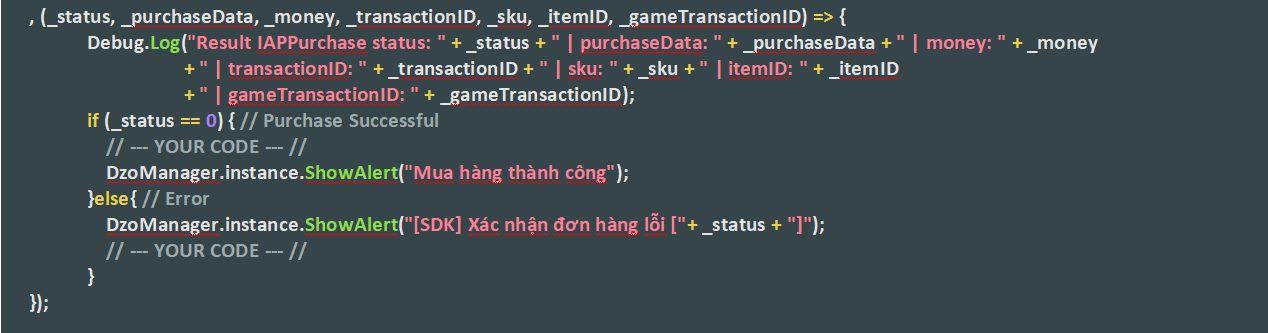
, (_status, _purchaseData, _money, _transactionID, _sku, _itemID, _gameTransactionID) => {
Debug.Log("Result IAPPurchase status: " + _status + " | purchaseData: " + _purchaseData + " | money: " + _money
+ " | transactionID: " + _transactionID + " | sku: " + _sku + " | itemID: " + _itemID
+ " | gameTransactionID: " + _gameTransactionID);
if (_status == 0) { // Purchase Successful
// --- YOUR CODE --- //
DzoManager.instance.ShowAlert("Mua hàng thành công");
}else{ // Error
DzoManager.instance.ShowAlert("[SDK] Xác nhận đơn hàng lỗi ["+ _status + "]");
// --- YOUR CODE --- //
}
});
After InitIAPPurchase successfully, you can call method PurchaseInAppProduct.
Method:
public void PurchaseInAppProduct(string _sku, string _itemID, string _roleID, string _gameTransaction)
| Type | Parameter Name | Type | Description |
| Input | sku | string |
Stock Keeping Unit of this item.
Ex: “skutest_20k_vnd” |
| itemID | string |
ID of Item in your game.
Ex: “sword01” |
|
| roleID | string |
UserID in in game.
Ex: “User123456” |
|
| gameTransaction | string |
Order code, transaction from the game. (Optional)
Ex: “10938093890130192830” |
Example:
public void DemoPurchaseIAP(){
    string _sku = "vn.dzogame.hkm_iap.9x";
    string _itemID = "item01";
    string _gameTransaction =""; //Optional
    string _roleID = "abcxyz";
    DzoPurchase.instance.PurchaseInAppProduct(_sku, _itemID, _roleID, _gameTransaction);
}
We have 2 Option for Verify Purchase process
Option 1: Gem/Cash add to client from Game Server after verify transaction success from DzoServer return.
FlowChart:
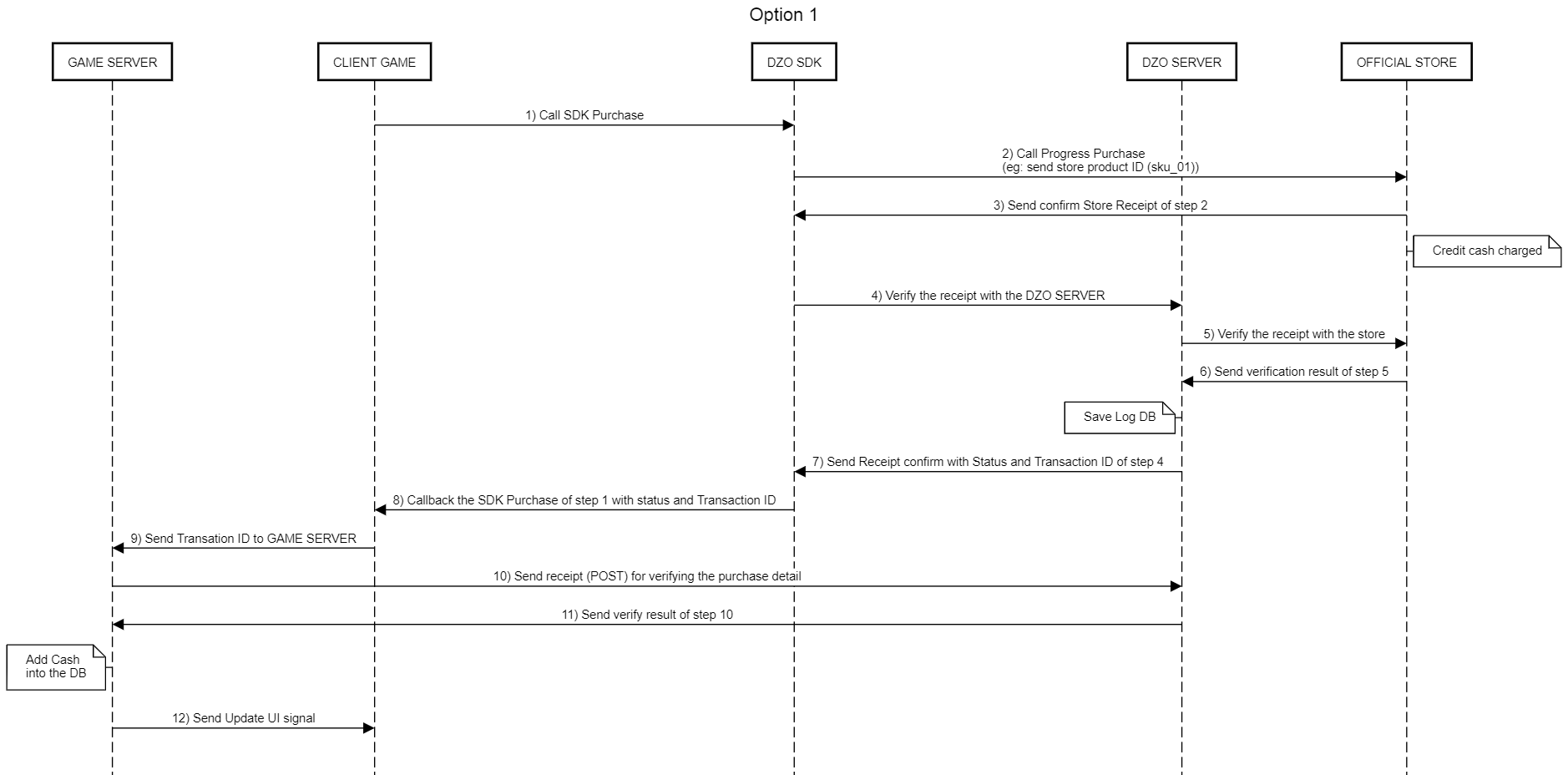
Overview:
Step 1. Client Games Call SDK Purchase
Step 2. SDK Process Purchase => Send data to Official Store (Apple/Google)
Step 3. Official Store Return Receipt to SDK
Step 4. SDK Send Receipt To Dzo Server for verify
Step 5. Dzo Server => Verify with Official Store Server with Receipt ID
Step 6. Save Log DB at Dzo Server
Step 7. Dzo Server Return SDK Status and TransactionID to Dzo
Step 8. Callback the SDK Purchase of step 1 with status and Transaction ID to Client Game
Step 9. Client Games Send TransactionID Dzo to Games Server
Step 10. Games Server Send POST to Dzo Server for getting detail Purchase and Amount Cash
Step 11. Dzo Server send verify result to Game Server
Step 12. Game Server Add Cash and return Client.
Note:
Step 8: Callback return in this (see more in method InitIAPPurchase)
Step 10: Games Server Send POST to Dzo Server for getting detail Purchase and Amount Cash.
GameServer side:
private void SendTransactionInfo(int platform, string transactionID, string sdkToken, string publickey, string serviceID, string deviceID, string UrlDzoServer, string secretKey )
{
    PurchaseQuery purchaseQuery = new PurchaseQuery();
    purchaseQuery.platform = platform; // platform as your device
    purchaseQuery.purchaseTransaction = transactionID; // TransactionID
    purchaseQuery.sdkToken = sdkToken;
    purchaseQuery.publicKey = publickey; // dzoServer provide to client
    purchaseQuery.secretKey = secretKey ; // DzoServer  provide to GameServer
    purchaseQuery.serviceID = serviceID;
    purchaseQuery.deviceId = deviceID;
    string data = Web.SendPost(JsonConvert.SerializeObject(purchaseQuery),
    UrlDzoServer);
    Response.Write(JsonConvert.SerializeObject(data));
}

public class PurchaseQuery
{
    public int platform { get; set; } // 0: android , 1: iOS
    public string purchaseTransaction { get; set; } // TransactionID
    public string sdkToken { get; set; }
    public string publicKey { get; set; }
    public string secretKey { get }
    public int serviceID { get; set; }
    public string deviceId { get; set; }
    public string sign { get { return Encryptor.General_server_signature(secretKey, serviceID.ToString(), deviceId, purchaseTransaction); } }
}
public static string General_server_signature(string publicKey, string param1 = "param1", string param2 = "param2", string param3 = "param3", string param4 = "param4", string param5 = "param5")
{
    List<string> p = new List<string>
    ();
    p.Add(publicKey);
    if (param2 != "")
    p.Add(param2);
    if (param3 != "")
    p.Add(param3);
    if (param4 != "")
    p.Add(param4);
    if (param5 != "")
    p.Add(param5);
    if (param5 != "")
    p.Add(param5);
    return GetMd5Hash(string.Join(publicKey, p));
}
public static string GetMd5Hash(string input)
{
    MD5 md5Hash = MD5.Create();
    byte[] data = md5Hash.ComputeHash(Encoding.ASCII.GetBytes(input));
    StringBuilder sBuilder = new StringBuilder();
    for (int i = 0; i < data.Length; i++)
    {
        string hexValue = data[i].ToString("X").ToLower();
        sBuilder.Append((hexValue.Length = = 1 ? "0" : "") + hexValue);
    }
    return sBuilder.ToString();
}
Example:
Link for Game Server to verify IAP:
API (Post) : {Server Type}/Payment/Server_Query_Transaction
public class Query_Payment_Result
{
    public string DatePurchage;
    public string Store_Transaction;
    public double Money;
    public string SKU;
    public string DzoTransaction;
    public int Status; //0: Sucess, <>0 Error
    public string ItemID;
    public string userHashID;        // new define for under Special Situation
}
/****Input****/
{
    "platform": 0,
    "purchaseTransaction": "GPA.3347-6520-4658-38421",
    "sdkToken": "e1b1922a58c2b93c324b63d16dce6add",
    "publicKey": "C52BB196C78925DAC6355D2F6287A21E",
    "secretKey": "906DAECB-A198-47C2-9C27-BA937AD93D4B",
    "serviceID": 502,
    "deviceId": "a460335e8d9fc1396825b441f8bdf782",
    "sign": "0ca0123ab87e1b21c3f09d723517dc9d"
}
/****Output****/
{
    "status": 0,
    "msg": "{"
    DatePurchage ":"
    7/11/2019 11:18:17AM ","
    Store_Transaction ":"
    GPA.3347-6520-4658-38421 ","
    Money ":10.0,"
    SKU ":"
    sky_1 ","
    DzoTransaction ":"
    1 ","
    Status ":0}",
    "tokenAuthen": null
}
Dzo Server send verify result to Game Server (Step 11)
Game Server Add Cash and return Client (Step 12)
*** Special situation:
- When Player Login in game with account A (Ex: Dzo.000000100) pay product IAP successfully with IAP transactionID (Ex: A) and this transactionID (A) and account ID A (Dzo. 000000100) are sent to Dzo Server -> get result is successful from Dzo Server => Step 1 to step 7 is success. Suppose that some reason which cannot confirmPendingPurchase transactionID (A) (Consume product purchase) to finish purchase processing.
- Player Login in game with account B (Ex: Dzo.0000200) but same acount Google/ Sanbox. Account B will get info Pending purchase of IAP Product (A) which isn’t confirmPendingPurchase yet. Because Store auto return IAP Product which isn’t confirmPendingPurchase yet and whenever get info IAP product from store, SDK will send trasaction ID to Dzo Server => Go to step 7, SDK will get status is -970 from Dzo Server.
Solve this issue:
Dzo Server still return status Success (status= 0) to SDK. And Continue processing as above flowChart. But GameServer need define more field as under class (userHashID).
public class Query_Payment_Result
{
    public string DatePurchage;
    public string Store_Transaction;
    public double Money;
    public string SKU;
    public string DzoTransaction;
    public int Status; //0: Sucess, <>0 Error
    public string ItemID;
    public string userHashID;        // New define for Special Situation
}
And go to step 10,11. After receive result from Dzo Server, with this situation Dzo Server will send userHashID of account A. Game Server have to add item in game base on userHashID which Dzo Server return. If Game Server add item successfully, GameServer will go to step 12 send status to SDK to confirmPendingPurchase (Finish purchase processing).
Option 2: Gem/Cash Add by DzoServer after success payment (DEV provide API add Gem/Cash) and return direct to Client Game.
Flowchar :
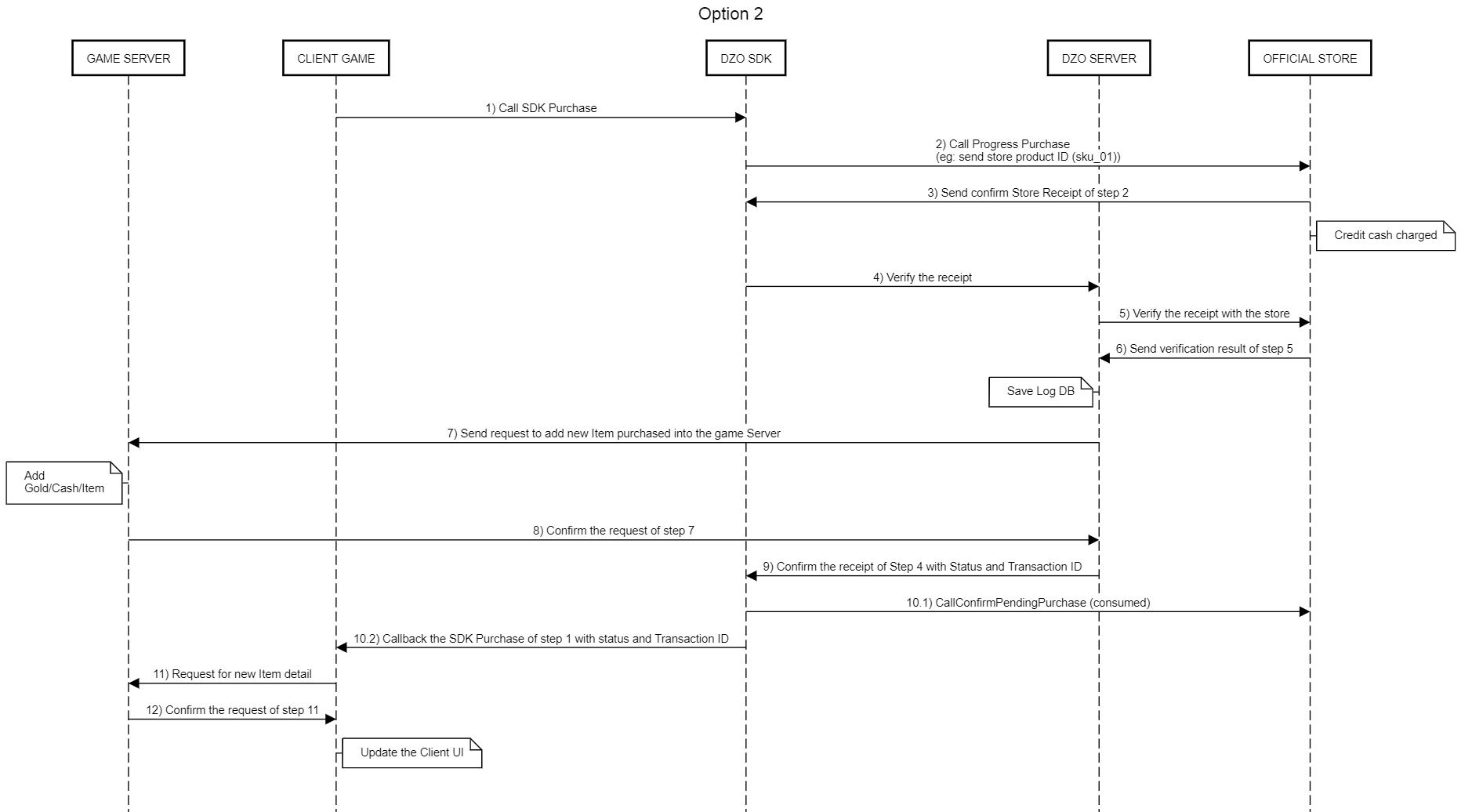
Overview:
Step 1. Client Games Call SDK Purchase
Step 2. SDK Process Purchase => Send data to Official Store (Apple/Google)
Step 3. Official Store Return Receipt to SDK
Step 4. SDK Send Receipt To Dzo Server for verify
Step 5. Dzo Server => Verify with Official Store Server with Receipt ID
Step 6. Save Log DB at Dzo Server
Step 7. Dzo Server Request Game Server to add the new item purchase (Add Cash)
Step 8. Game Server confirm the item purchase
Step 9. Dzo Server Return SDK Status and TransactionID to Dzo SDK
Step 10.1. Dzo SDK consume product purchase
Step 10.2. Callback the SDK Purchase with status and Transaction ID to Client Game
Step 11. Client Game request for new item detail
Step 12. Game Server return status request to Client Game
Note:
Step 9. Dzo Server Return SDK Status and TransactionID to Dzo Client (similar Option 1 step 8)
After Login successfully, you can call method InitDzoViPayment.
Method:
public void InitDzoViPayment(List<DzoViProduct> _products, Dzo.DzoManagerLib.CallbackDzoViPay _callback)

public class DzoViProduct
{
    public string productName, price, sku, itemID;
    public DzoViProduct(string _productName, string _price, string _sku, string _itemID = "")
    {
        productName = _productName;
        sku = _sku;
        price = _price;
        itemID = _itemID;
    }
}
public delegate void CallbackDzoViPay(int _status, string _msg, string _transactionID, string _sku, string _itemID, string _gameTransaction);
| Type | Parameter Name | Type | Description |
| Input | status | int |
0: Success
Other: Error |
| msg | string |
Message result payment
Ex: “Success” |
|
| transactionID | string |
Purchase Transaction ID
Ex: “GPA.3347-6520-4658-38421” |
|
| sku | string |
Stock Keeping Unit of this item
Ex: “skutest_20k_vnd” |
|
| gameTransaction | string |
Your gameTransaction that you input
Ex: “10938093890130192830” |
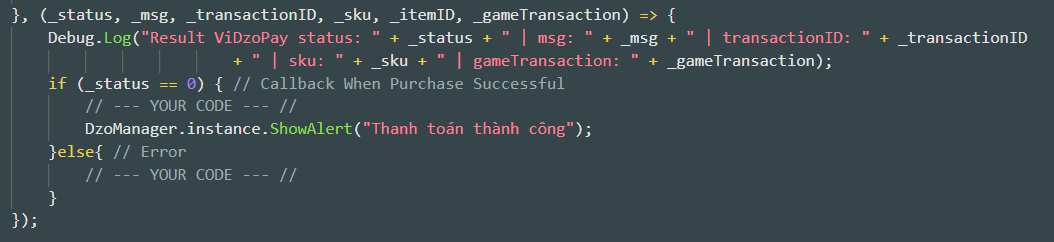
Example:
DzoPurchase.instance.InitDzoViPayment(new List<DzoViProduct>() {
    new DzoViProduct("90 Vàng", "20.000 DzoDong", "vn.dzogame.hkm_dzo.9", "DzoVi_Package01"),
    new DzoViProduct("90 Gem", "20.000 DzoDong", "vn.dzogame.hkm_dzo.9", "DzoVi_Package02")
    }
    , (_status, _msg, _transactionID, _sku, _itemID, _gameTransaction) => {
    Debug.Log("Result ViDzoPay status: " + _status + " | msg: " + _msg + " | transactionID: " + _transactionID + " | sku: " + _sku + " | gameTransaction: " + _gameTransaction);
    if (_status == 0) { // Callback When Purchase Successful
        // --- YOUR CODE --- //
        DzoManager.instance.ShowAlert("Thanh toán thành công");
    }else{ // Error
        // --- YOUR CODE --- //
    }
});
After InitDzoViPayment successfully, you can call method PurchaseDzoViProduct.
Method:
public void PurchaseDzoViProduct(string _sku, string _itemID, string _roleID, string _gameTransaction)
| Type | Parameter Name | Type | Description |
| Input | sku | string |
Stock Keeping Unit of this item.
Ex: “skutest_20k_vnd” |
| itemID | string |
ID of Item in your game.
Ex: “sword01” |
|
| roleID | string |
UserID in in game.
Ex: “User123456” |
|
| gameTransaction | string |
Order code, transaction from the game. (Optional)
Ex: “10938093890130192830” |
Example:
public void DemoPurchaseDzoVi(){
    string _sku = "vn.dzogame.hkm_dzo.9";
    string _itemID = "item01";
    string _gameTransaction =""; //Optional
    string _roleID = "abcxyz";
    DzoPurchase.instance.PurchaseDzoViProduct(_sku, _itemID, _roleID, _gameTransaction);
}
FlowChar:
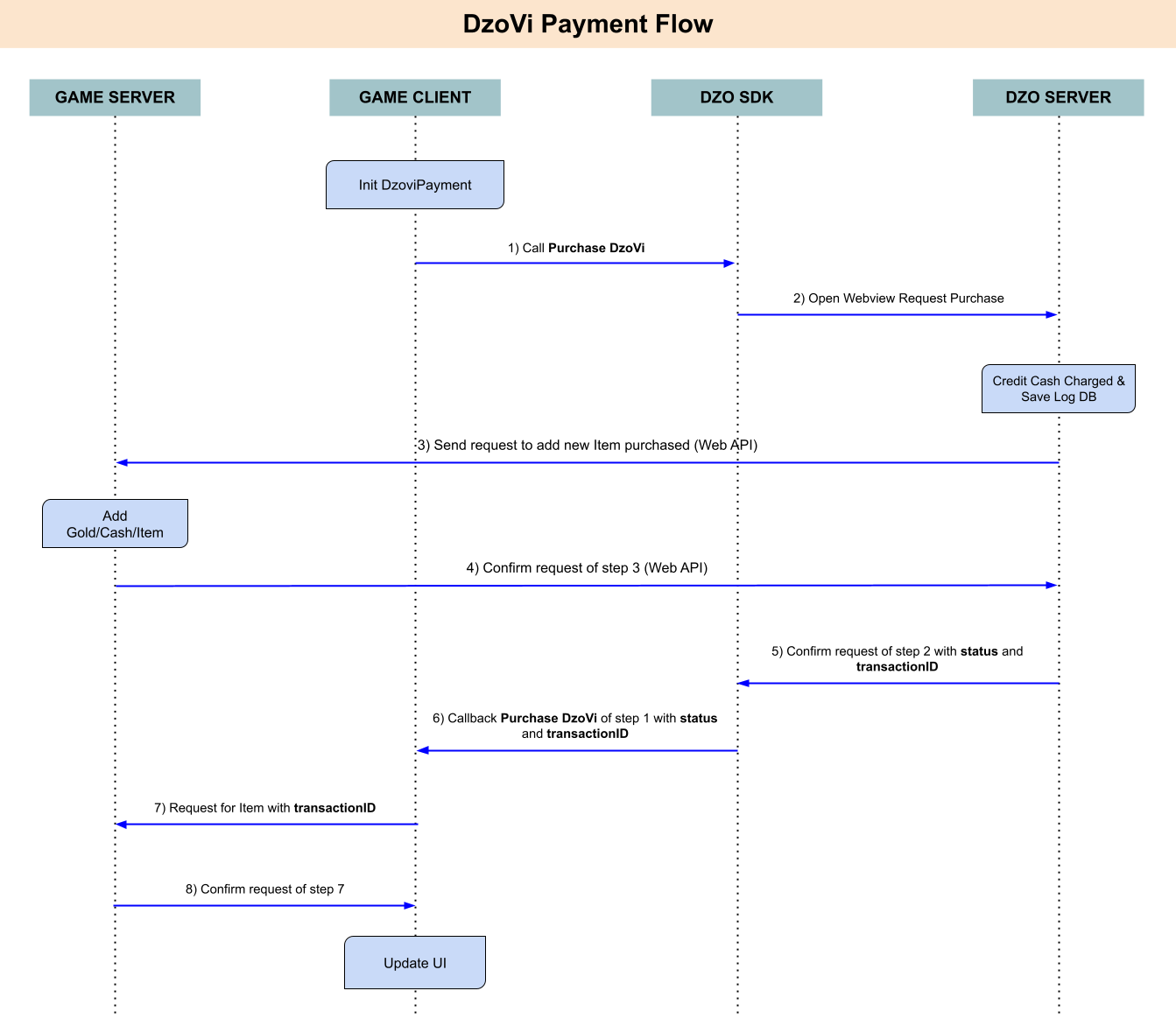
Note:
Step 6: Callback return in this (see more in method InitDzoViPayment)
After Login successfully, you can call method InitDzoViEventScoreRequest.
Method:
public void InitDzoViEventScoreRequest(List<DzoViProduct> _products, Dzo.DzoManagerLib.CallbackDzoVi_EventScoreRequest _callback)

public class DzoViProduct
{
    public string productName, price, sku, itemID;
    public DzoViProduct(string _productName, string _price, string _sku, string _itemID = "")
    {
        productName = _productName;
        sku = _sku;
        price = _price;
        itemID = _itemID;
    }
}

public delegate void CallbackDzoVi_EventScoreRequest(int _status, string _msg, int _price, long _balance, string _transactionID, string _sku, string _itemID, string _gameTransaction);
| Type | Parameter Name | Type | Description |
| Callback | status | int |
0: Success
Other: Error |
| msg | string |
Message result payment
Ex: “Success” |
|
| price | int |
Price of Item in Store
Ex: 20000 |
|
| balance | long |
Your DzoDong balance
Ex: 9999 |
|
| transactionID | string |
Purchase Transaction ID
Ex: “GPA.3347-6520-4658-38421” |
|
| sku | string |
Stock Keeping Unit of this item.
Ex: “skutest_20k_vnd” |
|
| itemID | string |
ID of Item in your game.
Ex: “sword01” |
|
| gameTransaction | string |
Order code, transaction from server game. (Optional)
Ex: “10938093890130192830” or “” |
Example:
DzoPurchase.instance.InitDzoViEventScoreRequest(new List<DzoViProduct>() {
    new DzoViProduct("90 Vàng", "20.000 DzoDong" , "vn.dzogame.hkm_dzo.9" ,"DzoVi_Event_Package01"),
    new DzoViProduct("90 Gem", "20.000 DzoDong" , "vn.dzogame.hkm_dzo.9" ,"DzoVi_Event_Package02")
    }, (_status, _msg, _price, _balance, _transactionID, _sku, _itemID, _gameTransaction)=>{
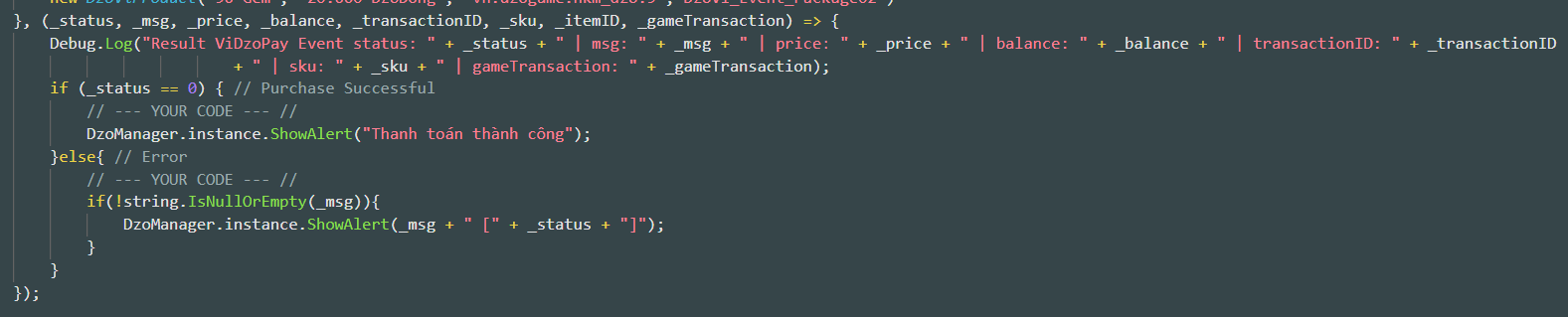
        Debug.Log("Result ViDzoPay Event status: " + _status + " | msg: " + _msg + " | price: " + _price + " | balance: " + _balance + " | transactionID: " + _transactionID + " | sku: " + _sku + " | gameTransaction: " + _gameTransaction);

        if (_status == 0) { // Purchase Successful
            // --- YOUR CODE --- //
            DzoManager.instance.ShowAlert("Thanh toán thành công");
        }else{ // Error
            // --- YOUR CODE --- //
        if(!string.IsNullOrEmpty(_msg)){
            DzoManager.instance.ShowAlert(_msg + " [" + _status + "]");
        }
    }
});
After InitDzoViEventScoreRequest successfully, you can call method PurchaseDzoViProduct.
Method:
public void PurchaseDzoVi_EventScoreRequest(string _sku, string _itemID, string _roleID, string _gameTransaction)
| Type | Parameter Name | Type | Description |
| Input | sku | string |
Stock Keeping Unit of this item.
Ex: “skutest_20k_vnd” |
| itemID | string |
ID of Item in your game.
Ex: “sword01” |
|
| roleID | string |
UserID in in game.
Ex: “User123456” |
|
| gameTransaction | string |
Order code, transaction from the game. (Optional)
Ex: “10938093890130192830” |
Example:
public void DemoDzoViPostScoreEvent(){
    string _sku = "vn.dzogame.hkm_dzo.9";
    string _itemID = "item01";

    string _gameTransaction =""; //Optional
    string _roleID = "abcxyz";
    DzoPurchase.instance.PurchaseDzoVi_EventScoreRequest(_sku, _itemID, _roleID, _gameTransaction);
}
Flow Char:
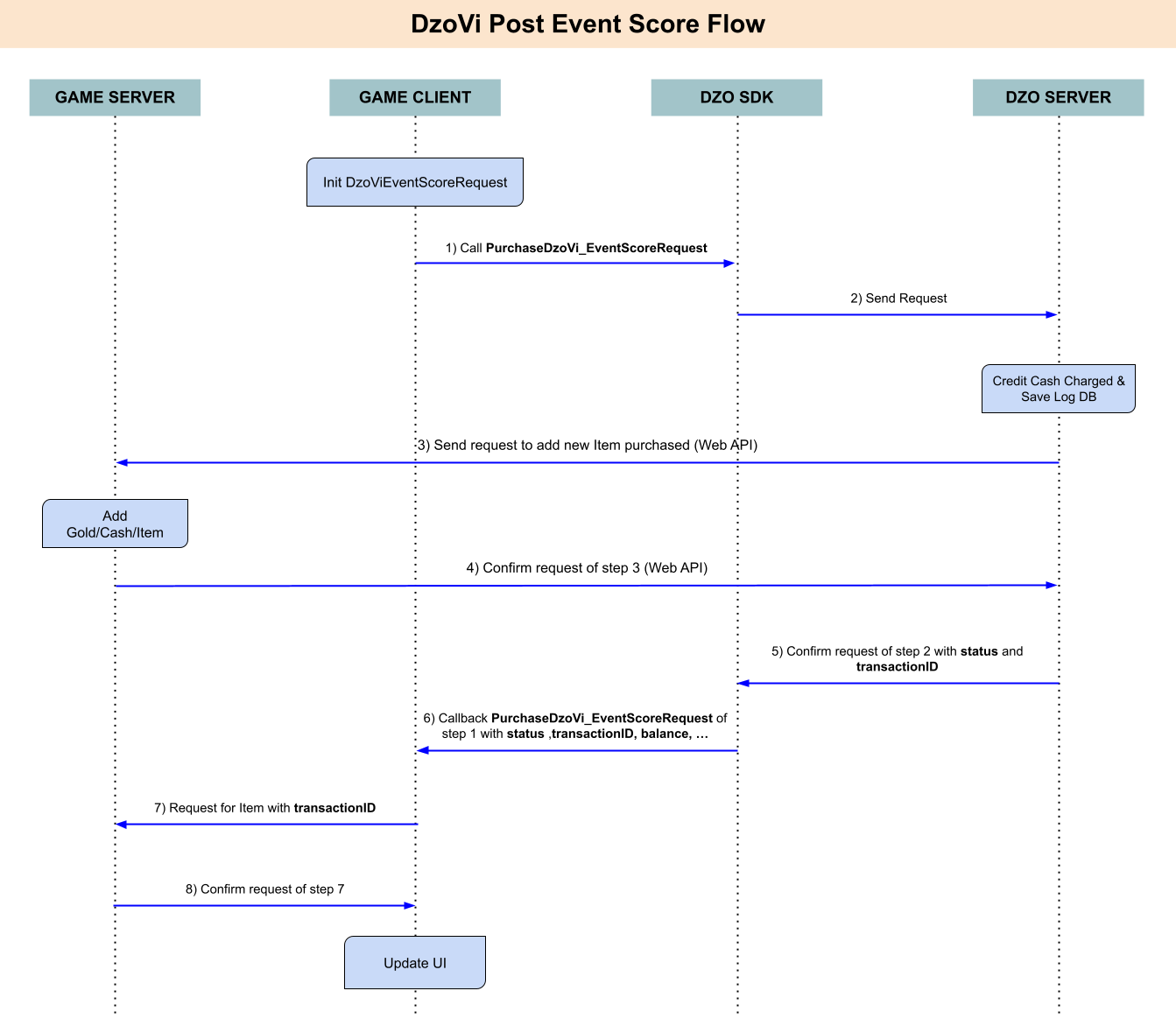
Note:
Step 6: Callback return in this (see more in method InitDzoViEventScoreRequest)
To active track event game by Firebase or AppsFlyer, you need setup like the image below
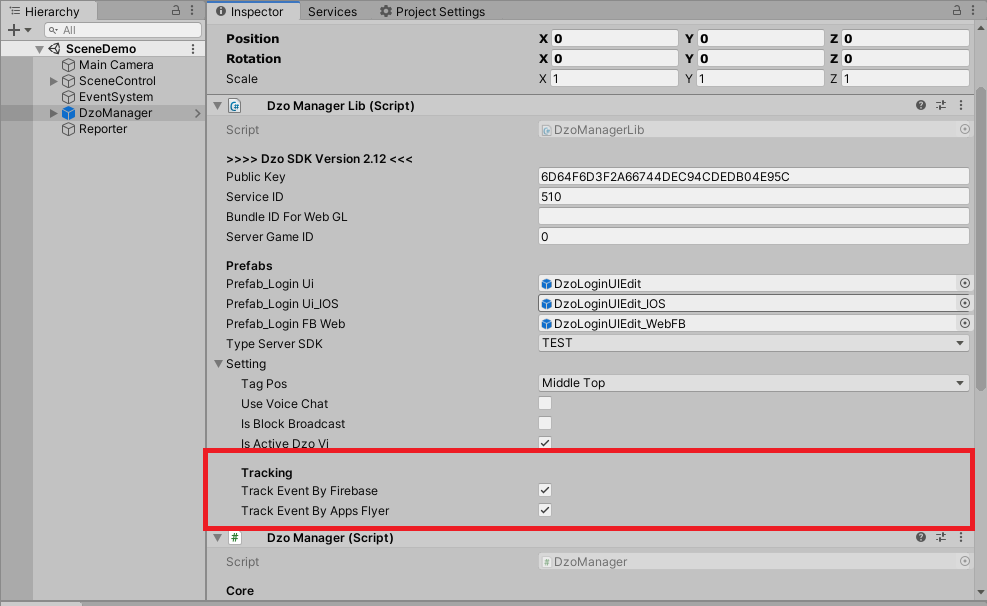
After that, you can call method to track event game.
1) Method Track Event Screen View:
public void TrackEventGame_ScreenView(string _screenName)
Example:
DzoManager.instance.dzoManagerLib.TrackEventGame_ScreenView("Profile");
2) Method Track Event Level Achieved:
public void TrackEventGame_LevelAchieved(int _level)
Example:
DzoManager.instance.dzoManagerLib.TrackEventGame_LevelAchieved(10);
3) Method Track Event Complete Registration:
public void TrackEventGame_CompleteRegistration()
Example:
DzoManager.instance.dzoManagerLib.TrackEventGame_CompleteRegistration();
4) Method Track Event Complete Tutorial:
public void TrackEventGame_CompleteTutorial(string _content)
Example:
DzoManager.instance.dzoManagerLib.TrackEventGame_CompleteTutorial("Buy Gold");
5) Method Track Event Achievement Unlocked:
public void TrackEventGame_AchievementUnlocked(string _content)
Example:
DzoManager.instance.dzoManagerLib.TrackEventGame_AchievementUnlocked("First Blood");
6) Method Track Event ReEngagements:
public void TrackEventGame_ReEngagements(string _content)
Example:
DzoManager.instance.dzoManagerLib.TrackEventGame_ReEngagements("Click Button Play");
7) Method Track Event Custom:
public void TrackEventGame(string _eventName, Dictionary<string, object> _paramater = null)
Example:
- Track Logout Event:
DzoManager.instance.dzoManagerLib.TrackEventGame("LogOut");
a) Show/Hide Floating Menu
Show:
DzoManager.instance.dzoManagerLib.ShowDzoFloating();
Hide:
DzoManager.instance.dzoManagerLib.HideDzoFloating();
b) Show Tag 18 Plus
DzoManager.instance.dzoManagerLib.ShowTag18Plus();
c) Start Show/Stop Broadcast
Start Show:
DzoManager.instance.dzoManagerLib.ShowBroadcast();
Stop
DzoManager.instance.StopIEBroadcast();