DzoSDK Document
English
2024-11-11DzoSDK For IOS Native Document v2.22
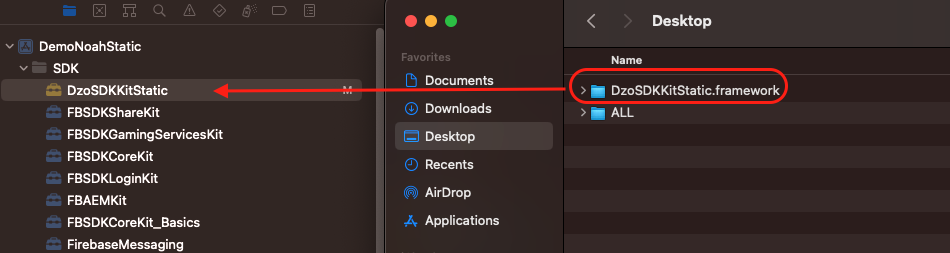
a. Add the DzoSDK framework library to the project.
Drag and drop the provided DzoSDK framework into the SDK folder of the project.
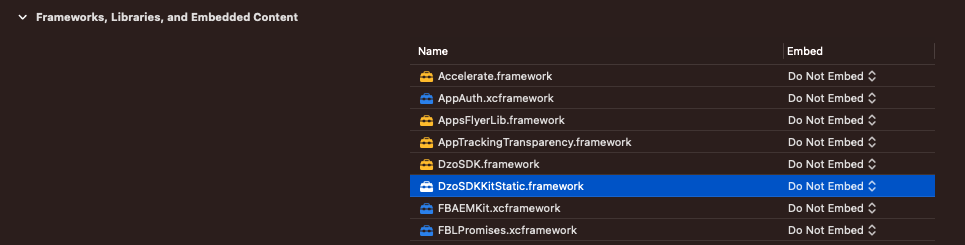
After dragging the DzoSDK into the project, it will appear under Frameworks, Libraries, and
Embedded Content. Under the Embed option, select "Do Not Embed".
b. Add Facebook and Google libraries
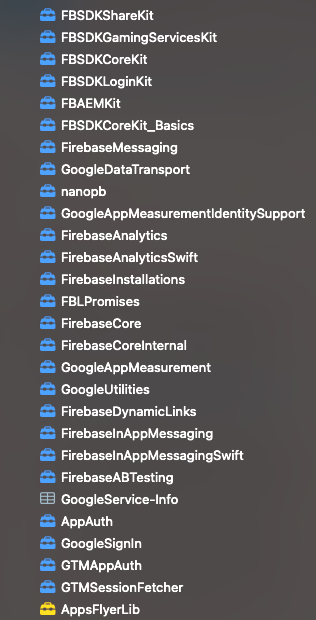
Unzip the SDK folder that contains the Facebook and Google libraries and drag and drop
them into the SDK folder of the project.
c.Add images and icons in DzoSDK framework
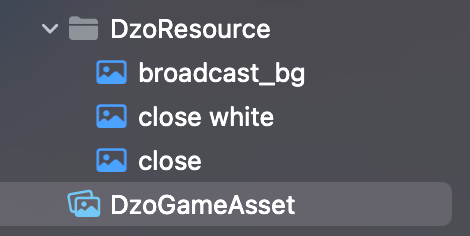
Add folders DzoResource and DzoGameAsset.xcassets to your project to be able to load images
and icons in the DzoSDK framework.
Configure the Info.plist file with an XML snippet that contains data about your app.
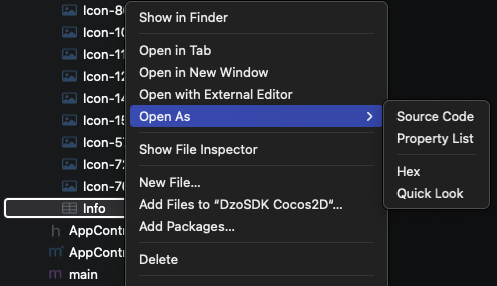
1.Right-click Info.plist, and choose Open As ▸ Source Code.
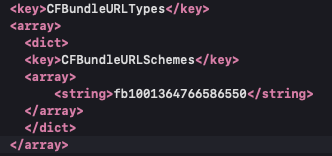
2.Copy and paste the following XML snippet into the body of your file (
            <key>CFBundleURLTypes</key>
            <array>
            <dict>
            <key>CFBundleURLSchemes</key>
            <array>
            <string>fbAPP-ID</string>
            </array>
            </dict>
            </array>
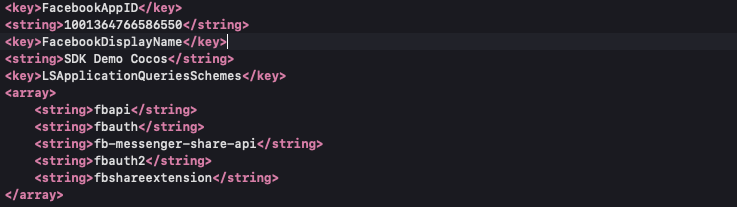
            <key>FacebookAppID</key>
            <string>APP-ID</string>
            <key>FacebookClientToken</key>
            <string>CLIENT-TOKEN</string>
            <key>FacebookDisplayName</key>
            <string>APP-NAME</string>
3.In
4.In
5.In
6.In
7.To use any of the Facebook dialogs (e.g., Login, Share, App Invites, etc.) that can perform an app switch to Facebook apps, your application's Info.plist also needs to include:
            <key>LSApplicationQueriesSchemes</key>
            <array>
            <string>fbapi</string>
            <string>fbauth</string>
            <string>fb-messenger-share-api</string>
            <string>fbauth2</string>
            <string>fbshareextension</string>
            </array>
Example
            <key>FacebookAutoLogAppEventsEnabled</key>
            <true/>
            <key>FacebookAdvertiserIDCollectionEnabled</key>
            <true/>
            <key>UIBackgroundModes</key>
            <array>
            <string>remote-notification</string>
            </array>
            <dict>
            <key>CFBundleTypeRole</key>
            <string>Editor</string>
            <key>CFBundleURLSchemes</key>
            <array>
            <string>com.googleusercontent.apps.xxxxxxx-xxxxxxxxxxxxxxxxxx</string>
            </array>
            </dict>
            <dict>
            <key>CFBundleTypeRole</key>
            <string>Editor</string>
            <key>CFBundleURLSchemes</key>
            <array>
            <string>vn.dzogame.xxxxxx</string>
            </array>
            </dict>

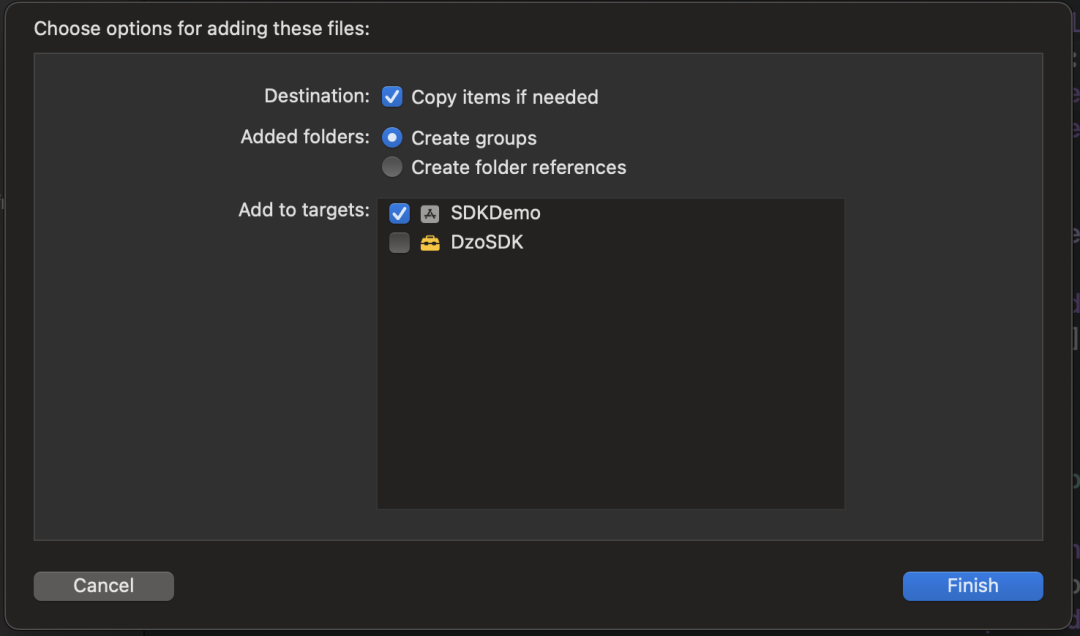
Copy “dzoconfig.json” to Project Resource
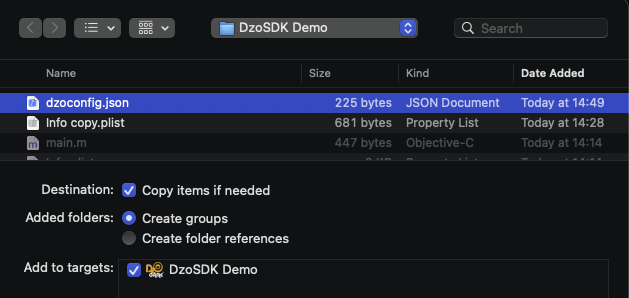
Config for DZOGAME
            "buildTarget": "DZOGAME",
            "useMultiLanguage": 0,
            "defaultLanguageID": "VI",
Adjust the position of the Age18+ icon and the Dzo icon on the screen:
Position default:
            "posision_default":[{
            "buttonDzoHome":"",
            "tag18Plus":"",
            }]
Customize the position with 8 anchor points:
topLeft, topCenter, topRight
centerLeft, centerRight
bottomLeft, bottomCenter, bottomRight
Example:
            "posision_default":[{
            "buttonDzoHome":"centerRight",
            "tag18Plus":"topLeft",
            }]
Custom color for Purchase Confirm Dialog
Example:
            "layout_dialog":[{
            "color_title":"#000000",
            "color_button_buy":"#FFFFFF",
            "color_button_cancel":"#000000",
            }]
Copy “GoogleService-Info.plist” to Project

Build for Dzogame
Copy file translations.json to project for Multi-Language function
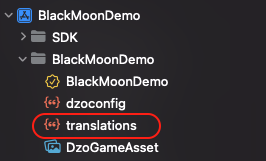
Targets / Project IOS
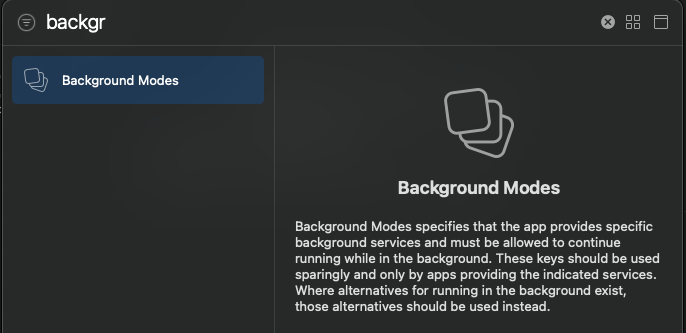
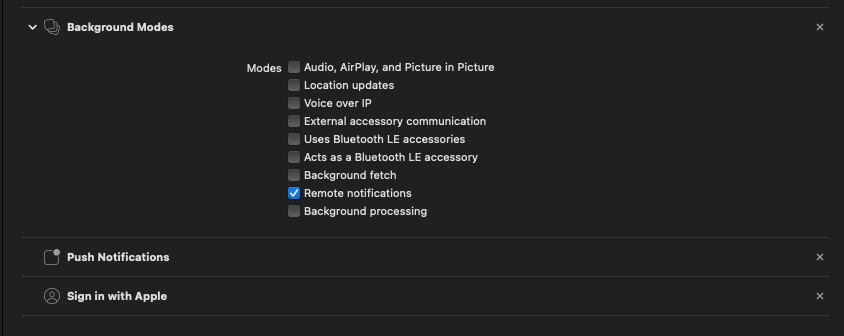
Click + Capability

Add Background modes, Enter
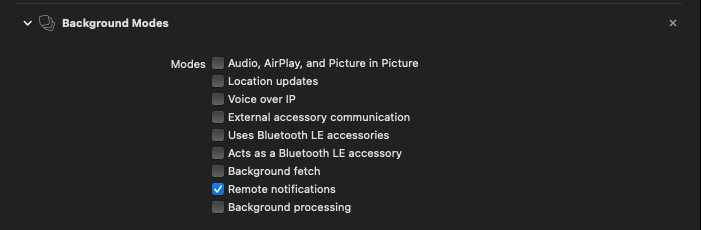
Check Remote notifications
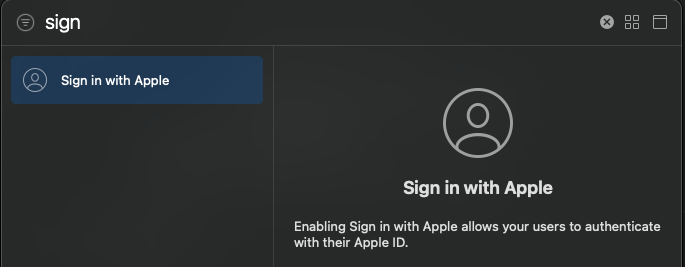
Add Sign in with Apple
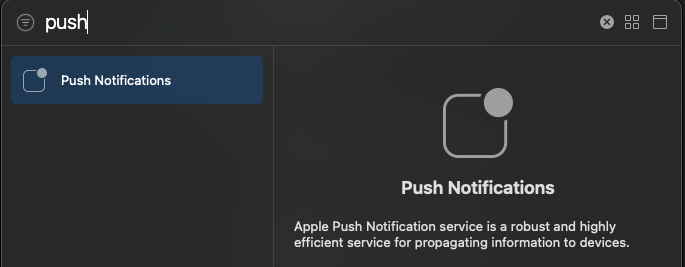
Add Push Notification
Final config like this picture
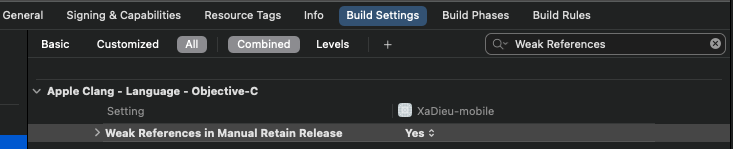
Set Build Settings -> Apple Clang - Language – Objective-C -> Weak References in Manual Retain Release to YES.
AppDelegate Objective-C – Init Connect SDK
Set Enviroment (Real/Test)
Set Debug mode view (Remove it when release)
Init connnect on didFinishLaunchingWithOptions
Import header on AppDelegate
            #import
                #import

                    //SDK DZO application instance
                    - (BOOL)application:(UIApplication *)application didFinishLaunchingWithOptions:(NSDictionary *)launchOptions
                    {


                    [[DZOSDKCoreKit sharedInstance] application:application didFinishLaunchingWithOptions:launchOptions];
                    return YES;
                    }

                    //SDK DZO openURL sourceApplication
                    - (BOOL)application:(UIApplication *)application openURL:(NSURL *)url sourceApplication:(NSString *)sourceApplication annotation:(id)annotation
                    {
                    NSLog(@"TAG openURL");
                    [[DZOSDKCoreKit sharedInstance] application:application openURL:url
                    sourceApplication:sourceApplication
                    annotation:annotation];
                    }


                    //SDK DZO openURL Referistall
                    #pragma mark DZOSDK FB Login, Google Login
                    - (BOOL)application:(UIApplication *)application openURL:(NSURL *)url options:(NSDictionary
                        *)options
                        {
                        NSLog(@"TAG openURL options");
                        [[DZOSDKCoreKit sharedInstance] application:application
                        openURL:url
                        options:options];
                        NSLog(@"TAG openURL");
                        return YES;
                        }

                        //SDK DZO Pushnotification
                        - (void)application:(UIApplication *)application didReceiveRemoteNotification:(NSDictionary *)userInfo fetchCompletionHandler:(void (^)(UIBackgroundFetchResult))completionHandler
                        {
                        NSLog(@"TAG didReceiveRemoteNotification");
                        [[DZOSDKCoreKit sharedInstance] application:application didReceiveRemoteNotification:userInfo
                        fetchCompletionHandler:completionHandler ];
                        }

                        //SDK DZO didRegisterForRemoteNotificationsWithDeviceToken
                        - (void)application:(UIApplication *)application didRegisterForRemoteNotificationsWithDeviceToken:(NSData *)deviceToken
                        {
                        NSLog(@"TAG didRegisterForRemoteNotificationsWithDeviceToken");
                        [[DZOSDKCoreKit sharedInstance] application:application
                        didRegisterForRemoteNotificationsWithDeviceToken:deviceToken];
                        }

                        //SDK DZO userNotificationCenter
                        - (void)userNotificationCenter:(UNUserNotificationCenter *)center
                        willPresentNotification:(UNNotification *)notification
                        withCompletionHandler:(void (^)(UNNotificationPresentationOptions))completionHandler
                        {
                        NSLog(@"TAG userNotificationCenter willPresentNotification");
                        [[DZOSDKCoreKit sharedInstance] userNotificationCenter:center
                        willPresentNotification:notification
                        withCompletionHandler:completionHandler];
                        }


                        //SDK DZO userNotificationCenter
                        - (void) userNotificationCenter:(UNUserNotificationCenter *)center
                        didReceiveNotificationResponse:(UNNotificationResponse *)response
                        withCompletionHandler:(void(^)(void))completionHandler
                        {
                        NSLog(@"TAG userNotificationCenter didReceiveNotificationResponse");
                        [[DZOSDKCoreKit sharedInstance] userNotificationCenter:center
                        didReceiveNotificationResponse:response
                        withCompletionHandler:completionHandler];
                        }

                        //SDK DZO application continueUserActivity
                        - (BOOL) application:(UIApplication *)application
                        continueUserActivity:(NSUserActivity *)userActivity
                        restorationHandler:(void (^)(NSArray *))restorationHandler
                        {
                        NSLog(@"TAG continueUserActivity");
                        [[DZOSDKCoreKit sharedInstance] application:application
                        continueUserActivity:userActivity
                        restorationHandler:restorationHandler];

                        }

                        //SDK DZO applicationDidBecomeActive for Appflyer
                        - (void)applicationDidBecomeActive:(UIApplication *)application {
                        {
                        //Appflyer Config
                        [[DZOSDKCoreKit sharedInstance] applicationDidBecomeActive:application];
                        }

                        //Ver 2.19
                        #pragma mark DZOSDK Share detection
                        - (void)applicationDidFinishLaunching:(UIApplication *)application {
                        [[DZOSDKCoreKit sharedInstance] applicationDidFinishLaunching:application];

                        }
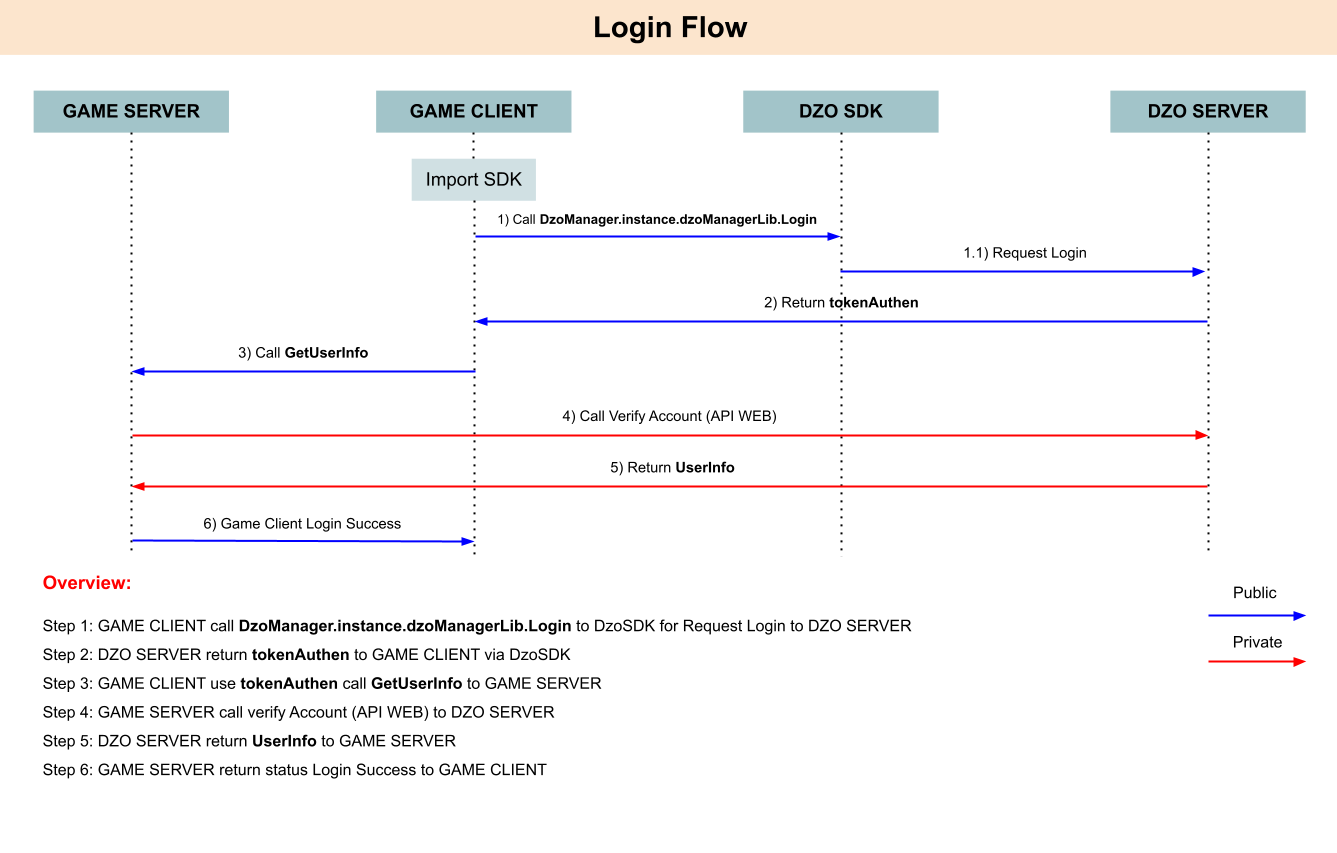
            [[DZOSDKCoreKit sharedInstance] InitData:^(SDKResult *result, NSError *error) {
            if (error == nil) {
            if([result.status isEqual:@0]) {
            NSLog(@"Init SDK Success: %@", result.status);
            } else {
            NSLog(@"Init Error With Status: %@", result.status);
            }
            }
            }];
Call DZOSDKCoreKit with Login Process:
[[DZOSDKCoreKit sharedInstance] Login:^(UserInfo *result, NSError *error)
After login Success: Data return
            NSNumber *statusAccount; // 0: Success, Other is Error
            NSString *token;	 // Token Login when Sucess
Example: For Login Process – Show Dialog
            #import
                #import
                    #import

                        //Show Dialog Login
                        void DzoUIKit::doLogin()
                        {
                        NSLog(@"doLogin ");
                        [[DZOSDKCoreKit sharedInstance] Login:^(UserInfo *result, NSError *error) {
                        //Handle Login
                        if(error == nil){
                        NSLog(@"Account Info 1: Status [%d], tokenSDK: [%@]", result.statusAccount,result.token );
                        NSNumber *status = result.statusAccount;
                        NSString *token = result.token;
                        //Login Sucess, return Token
                        if([status isEqual:@0])
                        {
                        std::string _token([token UTF8String]);
                        loginActionFinished(_token);
                        }
                        //Login Error, token Null
                        else
                        {
                        NSLog(@"Login Error: %@", status);
                        }
                        } else {
                        NSLog(@"Login Error: %@", error);
                        }
                        }];
                        }
After Success Login : Data return Status and Token SDK (statusAccount , token)
Requirements from Game need to show DzoIcon Floating (Gadget) , Aga Floating (Gadget) / Broadcast
Message over (ShowDzoFloating, ShowAgeFloating, ShowBroadcast)
Call DZOSDKCoreKit with Logout Process:
[[DZOSDKCoreKit sharedInstance] Logout:^(SDKResult *result, NSError *error)
Example:
            //Call logout to switch Account
            void DzoUIKit::doLogout()
            {
            [[DZOSDKCoreKit sharedInstance] Logout:^(SDKResult *result,    NSError  *error) {
            if(error == nil){
            NSLog(@"Logout Result: [%d], [%@]", result.status.stringValue,result.message );
            //Logout Success
            if([result.status isEqual:@0])
            {
            logoutActionFinished();         //Do logout on Game Screen
            }
            else
            {
            NSLog(@"Login Error: %@", result.status.stringValue);
            }
            } else {
            NSLog(@"Login Error: %@", error);
            }
            }];
            }
When logout Success status return = 0, or status is Error
Description: When clicking to buy, the system automatically selects the type of IAP method rule or
Dzovi Purchase
- After receiving the PurchaseType from the server, the SDK Client will automatically call the
payment method
Call DZOSDKCoreKit with MultiPayment Process:
            [[DZOSDKCoreKit sharedInstance] MultiPayment:_productID ItemID:_itemID GameTransaction:_gameTransaction RoleID:_roleID handler:^(SDKResult_MultiPayment *result, NSError *error) {
            // callback here
            }
Example:
            [[DZOSDKCoreKit sharedInstance] MultiPayment:_productID ItemID:_itemID GameTransaction:_gameTransaction RoleID:_roleID handler:^(SDKResult_MultiPayment *result, NSError *error) {
            if (error == nil) {
            NSLog(@"MultiPayment result: [%@], [%@]", result.status, result.message);
            // success
            if ([result.status isEqual:@0]) {
            NSLog(@"MultiPayment result: [%@] [%@] [%@] [%@] [%@] [%@] [%@]", result.status, result.message, result.transactionID, result.money, result.balance, result.sku, result.gameTransaction);
            } else {
            NSLog(@"MultiPayment error: [%@] [%@]",result.status, result.message);
            }
            } else {
            NSLog(@"MultiPayment error: %@", error);
            }
            }];
Get DzoCoin:
To Show ingame DzoCoin, we can use function RegisCallbackUpdateDzoCoin to show in game, DzoCoin will delay to some second from system wallet.
            [[DZOSDKCoreKit sharedInstance] RegisCallbackUpdateDzoCoin:^(SDKResult_DzoCoin *result, NSError *error) {
            NSUInteger dzocoin = [result.dzoCoin integerValue];
            NSLog(@"CallbackUpdateDzoCoin: %lu", (unsigned long)dzocoin);
            txtDzoCoin.text = [[DZOSDKCoreKit sharedInstance] FormatCurrency:dzocoin];
            }];
Format DzoCoin:
To format the display of dzocoin, use the [[DZOSDKCoreKit sharedInstance] FormatCurrency:dzocoin]; function.
Example of displayed results: -Input: 999 -> Display: 999 -Input: 1234 -> Display: 1,234 -Input: 25000 -> Display: 25,000 -Input: 123456 -> Display: 123.45K -Input: 1234567 -> Display: 1.23M -Input: 1234567891 -> Display: 1.23B
To Active tracking Event Firebase, or Appflyer you can config on dzoconfig.json.
useFirebaseTracking, useAppsFlyerTracking
1: Active
0: Deactive
To call Method for tracking event:
1. Method tracking Game ScreenView:
- (void) TrackEventGame_ScreenView:(NSString *)ScreenName;
Example: At Lobby PVP , Dungeon
            [[DZOSDKCoreKit sharedInstance] TrackEventGame_ScreenView:@"Lobby_PVP"];
            [[DZOSDKCoreKit sharedInstance] TrackEventGame_ScreenView:@"Dungeon_1"];
2. Method tracking Level Achieved:
- (void) TrackEventGame_LevelAchieved:(int)level;
Example: User level up 1, 5, 10
            [[DZOSDKCoreKit sharedInstance] TrackEventGame_LevelAchieved:1];
            [[DZOSDKCoreKit sharedInstance] TrackEventGame_LevelAchieved:5];
            [[DZOSDKCoreKit sharedInstance] TrackEventGame_LevelAchieved:10];
3. Method tracking Complete Registration:
- (void) TrackEventGame_CompleteRegistration:(NSString *)content;
Example: Start_Update, End_Update, Create_Char
            [[DZOSDKCoreKit sharedInstance] TrackEventGame_CompleteRegistration:@"Start_Update"];
            [[DZOSDKCoreKit sharedInstance] TrackEventGame_CompleteRegistration:@"End_Update"];
            [[DZOSDKCoreKit sharedInstance] TrackEventGame_CompleteRegistration:@"Create_Charater"];
4. Method tracking Complete Tutorial:
- (void) TrackEventGame_CompleteTutorial:(NSString *)content;
Example: Complete Tutorial_1
[[DZOSDKCoreKit sharedInstance] TrackEventGame_CompleteTutorial:@"Tutorial_1"];
5. Method tracking Achievement Unlock:
- (void) TrackEventGame_AchievementUnlocked:(NSString *)content;
Example: Open First LootBox, Clear Finish Dungeon red
            [[DZOSDKCoreKit sharedInstance] TrackEventGame_AchievementUnlocked:@"Open_First_Lootbox"];
            [[DZOSDKCoreKit sharedInstance] TrackEventGame_AchievementUnlocked:@"Final_Dungeon_Red"];
6. Method tracking ReEngaments:
- (void) TrackEventGame_ReEngagements:(NSString *)content;
Example: User Click Event Icon, Click Shop Event icon
            [[DZOSDKCoreKit sharedInstance] TrackEventGame_ReEngagements:@"Open_Event_Icon"];
            [[DZOSDKCoreKit sharedInstance] TrackEventGame_ReEngagements:@"Open_Shop_Event"];
7. Method tracking Event normal:
- (void) TrackEventGame:(NSString *)eventvalue;
Example: some info need to track with simple name
            [[DZOSDKCoreKit sharedInstance] TrackEventGame:@"Custom_info_1"];
            [[DZOSDKCoreKit sharedInstance] TrackEventGame:@"Custom_info_2"];
8. Method tracking Event Custom:
- (void) TrackEventGame:(NSString *)eventName parameters:(NSDictionary *)eventValue;
Example:
            NSArray *items = @[product1];

            NSDictionary *ecommerce = @{
            @"items": items,
            @"ListName" : @"Search Results",
            };
            NSString *eventName = @"ItemList";
            [[DZOSDKCoreKit sharedInstance] TrackEventGame:eventName parameters:ecommerce];
9. Set role User (Ver 2.20.1)
            RoleInfo *_roleInfo = [[RoleInfo alloc] init];
            _roleInfo.roleID=@"TestRoleID";		//game roleID
            _roleInfo.serverGameID=@"1";			//game Server/Channel/Zone
            _roleInfo.charName=@"TestRoleName";		//Ingame Name
            _roleInfo.level=@100;
            _roleInfo.serverGameName=@"Server 1";	//Server Name/Zone Name/Channel name
            [[DZOSDKCoreKit sharedInstance] set_RoleInfo:_roleInfo];
a.Get Device ID
Call Method get_DeviceID to get device ID from IOS
- (NSString *) get_DeviceID;
Example: get device ID from IOS
            NSString * DeviceID=   [[DZOSDKCoreKit sharedInstance] get_DeviceID];
            NSLog(@"Device ID - %@",DeviceID);
b.Set/Get GameServerID
To Set ServerGame for Login, or switch Server game from Game Screen
Call Method
            - (void) set_serverGameID:(int) serverGameID;
            - (int) get_serverGameID;
Example: To login gamer after select Server, we can set Game ServerID before Call Login Method
            [[DZOSDKCoreKit sharedInstance] set_serverGameID:2];
            int i_ServerID= [[DZOSDKCoreKit sharedInstance]  get_serverGameID];
            NSLog(@"Servergame ID - %i", i_ServerID);
c.Get token SDK after Login game Success
Call Method get_tokenSDK to get Token SDK
- (NSString *) get_tokenSDK;
Example: get token SDK after login success
            NSString * s_Token= [[DZOSDKCoreKit sharedInstance]  get_tokenSDK];
            NSLog(@"Token SDK - %@", s_Token);
            [[DZOSDKCoreKit sharedInstance] FB_Share_ScreenShot:^(SDKResult *result, NSError *error) {
            if (error == nil) {
            // share success
            if([result.status isEqual:@0]) {
            NSLog(@"FBShareScreenShot result: %@ %@", result.status, result.message);
            } else {
            NSLog(@"FBShareScreenShot Error: %@ %@", result.status, result.message);
            }
            } else {
            NSLog(@"FBShareScreenShot error: %@", error);
            }
            }];
            NSString *_url = @"https://dzogame.vn/Layout_2020/assets/img/vechungtoi.jpg";
            [[DZOSDKCoreKit sharedInstance] FB_Share_Photo: _url handler:^(SDKResult *result, NSError *error) {
            if (error == nil) {
            // share success
            if([result.status isEqual:@0]) {
            NSLog(@"FBSharePhoto result: %@ %@", result.status, result.message);
            } else {
            NSLog(@"FBSharePhoto error: %@ %@", result.status, result.message);
            }
            } else {
            NSLog(@"FBSharePhoto error: %@", error);
            }
            }];
            [[DZOSDKCoreKit sharedInstance] FB_Share_LinkInstallApp:^(SDKResult * _Nonnull result, NSError * _Nonnull error) {
            if (error == nil) {
            if([result.status isEqual:@0]) {
            NSLog(@"FBShareLinkInstallApp result: [%@], [%@]", result.status, result.message);
            } else {
            NSLog(@"FBShareLinkInstallApp error: [%@], [%@]", result.status, result.message);
            }
            } else {
            NSLog(@"FBShareLinkInstallApp error: [%@]", error);
            }
            }];
Before uses Delegate need to setting from header file, and set delegate on code
            //MainController.h

            @interface MainController : UIViewController


                //MainController.m
                - (void)viewDidLoad {
                [super viewDidLoad];
                DZOSDK_Event_Class *multicastDelegate = [[DZOSDK_Event_Class alloc] init];
                [multicastDelegate addDelegate:self];
                }
a.Gift Code Delegate
Auto fill gift code from player to return to Game function
            //MainController.m
            - (void)gift_event:(NSInteger *)Status msg:(NSString *)msg  Serial:(NSString *)Serial  ServerID:(NSInteger *)ServerID
            {
            NSLog(@"Dzo gift_event delegate: %i [%@] [%@] [%i]" , Status, msg , Serial,ServerID );
            }
b.Score Event Delegate
Auto return Score_Number (Dzocoin from wallet) when Dzocoin from wallet update
            //MainController.m
            - (void)score_event:(NSInteger *)Balance;
            {
            NSLog(@"Dzo score_event delegate: %i " , Balance);
            }
c.Logout Event Delegate
When server Dzo SDK need force logout player
            //MainController.m
            - (void)kick_logout:(NSString *)msg;{
            NSLog(@"Dzo kick_logout delegate: %@ " , msg);
            }
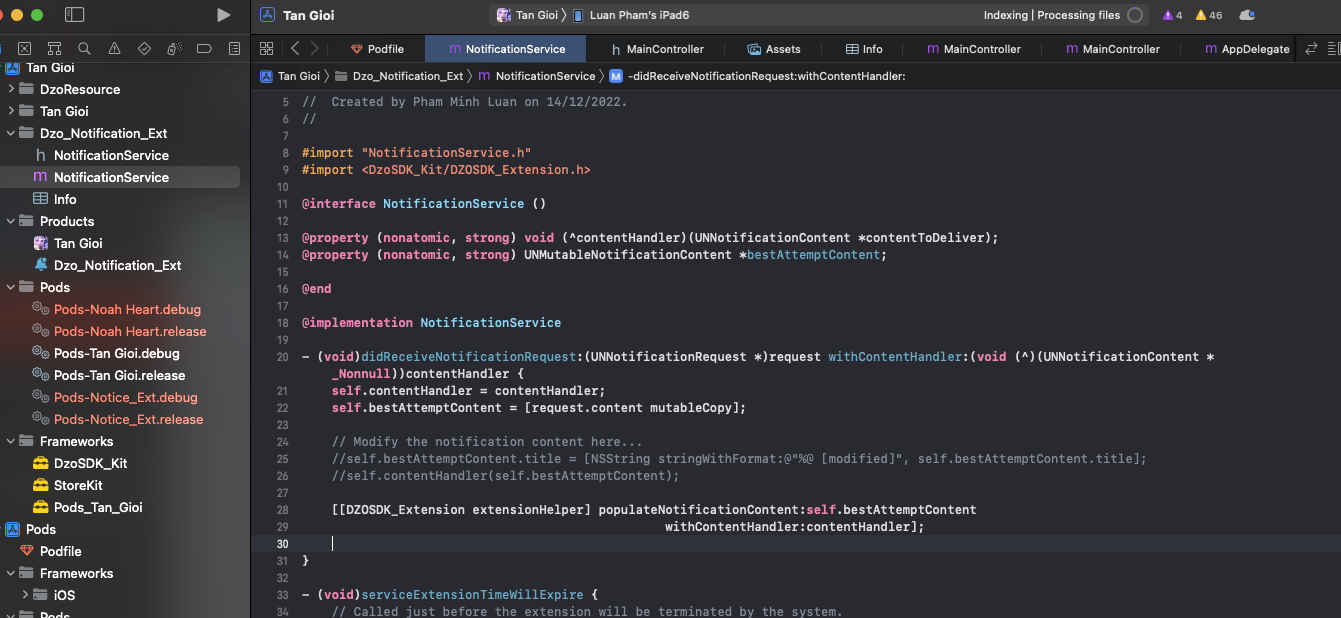
Xcode => File => New => Target
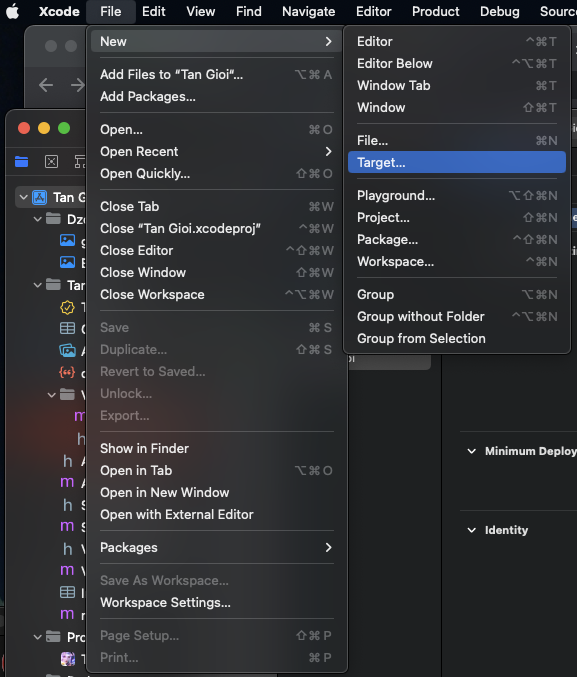
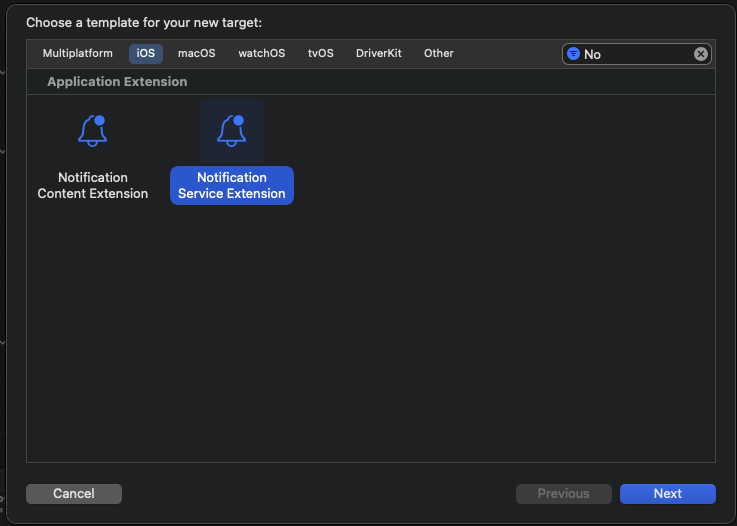
iOS => Notification Service Extension => Next
Product Name : Dzo_Notification_Ext
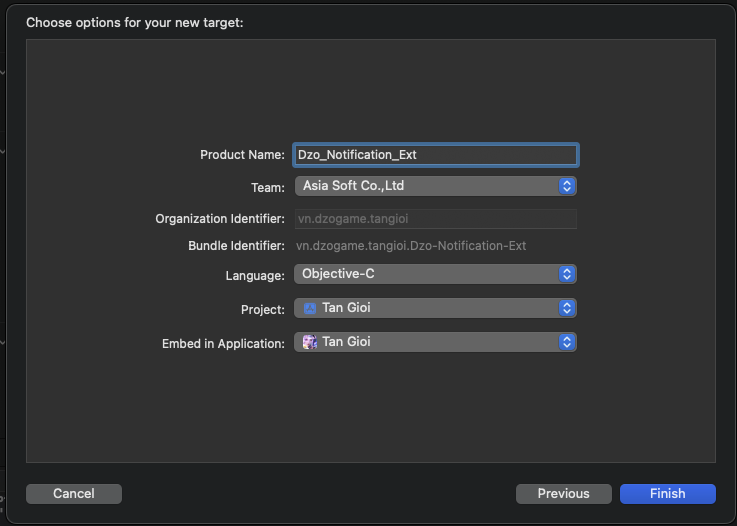
Add Target for Extension:
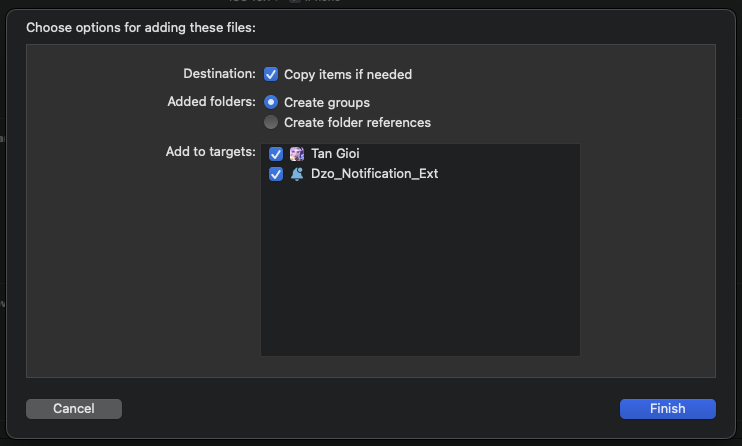
Frameworks => DzoSDK_Kit => Dzo_Notification_Ext => Target Membership => check “Dzo_Notification_Ext” required

Edit NotificationService.m
            #import
                - (void)didReceiveNotificationRequest:(UNNotificationRequest *)request withContentHandler:(void (^)(UNNotificationContent * _Nonnull))contentHandler {
                [[DZOSDK_Extension extensionHelper]
                populateNotificationContent:self.bestAttemptContent
                withContentHandler:contentHandler];
                }
Everytime Import Framework need to tick target “Dzo_Notification_Ext”
Description: This is a feature that allows you to change the default logo to a custom logo. To use it, rename your logo to "custom_logo" and then drag it into the DzoGameAsset.xcassets image management folder. If there is no image with the name "custom_logo," then the default DzoGame logo will be used.
Description: This is a navigation feature to the Facebook app if you have the app installed, otherwise it will switch to the webview when you press the button to access Facebook (with any pageID / groupID / profileID).
Call DZOSDKCoreKit with linkToFBAppWebView with pageID, strTypeLinkPage is “page”
[[DZOSDKCoreKit sharedInstance] linkToFBAppWebView:pageID strTypeLink:strTypeLinkPage typeCheck:2];
Call DZOSDKCoreKit with linkToFBAppWebView with groupID, strTypeLinkPage is “group”
[[DZOSDKCoreKit sharedInstance] linkToFBAppWebView:groupID strTypeLink:strTypeLinkGroup typeCheck:2];
Call DZOSDKCoreKit with linkToFBAppWebView with profileID, strTypeLinkPage is “profile”
[[DZOSDKCoreKit sharedInstance] linkToFBAppWebView:profileID strTypeLink:strTypeLinkProfile typeCheck:2];
Description: When the user presses a button in the game, they will be directed to a desired tab in a webview, value of deeplinkWebView with any content you want to pass in.
Example:
[[DZOSDKCoreKit sharedInstance] linkToFBAppWebView:profileID strTypeLink:strTypeLinkProfile typeCheck:2];
Description: App rating feature
Call DZOSDKCoreKit with DisplayReview Process:
[[DZOSDKCoreKit sharedInstance] DisplayReview];